AI Appointment Scheduling: How AI Is Changing Booking Management
AI appointment scheduling without the hype: where AI helps a small business with bookings today, where it promises what you don't offer, and how to keep it in check.

A salon owner gets an email offering AI appointment scheduling: an assistant that “answers every message and books appointments 24/7.” It sounds like the end of the phone ringing halfway through a color. What the email doesn’t say is what the assistant does when a customer asks for a service the salon doesn’t offer, or for a Saturday slot that went an hour ago.
That question already has a court answer. In February 2024, British Columbia’s Civil Resolution Tribunal ordered Air Canada to compensate a customer after the airline’s website chatbot told him he could claim a bereavement fare after traveling, which the airline’s own policy didn’t allow (Global News, February 15, 2024, checked on October 29, 2026). The airline argued it wasn’t responsible for what the chatbot said. The tribunal disagreed.
Most AI scheduling pitches put the AI in charge of the schedule. Our view is that the useful version puts the AI in front of a booking system that still decides what can be booked: the AI is a new way to ask, and the hours, prices and double-booking rules stay in software that doesn’t guess. We build Schedopia, a free, self-hosted WordPress booking plugin with an AI connection of its own, so we have a stake; the test at the end of this post works on any tool.
What is AI appointment scheduling?
AI appointment scheduling is the use of an AI model, the technology behind ChatGPT and Claude, to take, change or look up bookings in plain language instead of through a booking form or an admin screen. It turns up in four places, and they carry very different risks:
| Where the AI sits | What it does | What goes wrong |
|---|---|---|
| A chatbot on your website | Answers “anything Thursday after 5?” and books it | States prices, services or policies you don’t have |
| An AI phone receptionist | Answers calls, takes bookings by voice | Mishears a name or a time, with nobody listening |
| An assistant for the owner | “Who’s in tomorrow?”, “Move Sam to 3:00 PM” | Acts on the wrong Sam if you don’t check |
| Predictions | Flags likely no-shows or busy weeks | Learns from too little history to be right |
The first two face customers, who act on whatever the AI tells them. The third faces you, and you read the answer before anything happens. That difference matters more than which model is underneath.
Where AI helps with bookings today
AI helps most where the work is language, not arithmetic: understanding a question, finding the right record and saying what it found. Checking whether 2:00 PM is free is arithmetic, and a booking system already does it without mistakes.
On the owner’s side, that means the admin chores that take five clicks and a search. “Find me a free hour with Maya next week.” “How did October compare with September?” “Block Friday afternoon, the studio’s closed.” “Which customers came in during August and haven’t booked since?” Each is a question you could answer from the admin, more slowly. Asking in a sentence is quicker, and the answer comes back to you before anyone outside sees it.
On the customer’s side, AI is good at the questions that come before a booking: “do you do balayage on short hair?”, “is there parking?”, “how long does a full color take?” A business that gets dozens of those a day, by message or phone, can save real time. The booking itself is the part to keep on rails.
Where AI goes wrong in scheduling
AI goes wrong in scheduling when it answers from what it thinks is true instead of what your system says is true. A language model writes the most likely next sentence. Asked about your prices, it can produce a confident, plausible and wrong one, as Air Canada found.
Three failures are specific to bookings:
- Inventing availability. An assistant that remembers your hours instead of checking them can offer a time you’re closed, or a slot someone took five minutes ago.
- Booking around the rules. An AI that writes straight into a calendar skips whatever the booking system enforces: buffers, minimum notice, the double-booking check.
- Acting on a vague instruction. “Move Sam’s appointment to Thursday” is clear to you and ambiguous to software if two customers are called Sam.
Predictions have a different problem: not enough data. A salon with 40 appointments a week and a 5% no-show rate sees about two no-shows a week, around 100 a year, spread across dozens of customers. That’s thin ground for a model to learn who will miss next time. Reminders, a cancellation cut-off and, where you can take them, deposits do more for a business that size.
The rule: the AI asks, the booking system decides
AI appointment scheduling is safe when every booking the AI makes goes through the same checks as a booking made on your form. The AI can understand the request, look up the options and ask for a slot; the booking system checks the hours, the staff member, the buffers and the existing bookings, and says yes or no. An AI set up that way can misunderstand a customer, but it can’t sell a time that isn’t free.
Six questions sort the tools that work this way from the ones that don’t:
- Does every AI booking go through the same availability and double-booking checks as the booking form?
- Are prices, services and policies looked up from your settings each time, or written into the AI’s instructions once and left to go stale?
- Can you let the AI read without letting it change anything, and switch on changes one kind at a time?
- Is every action logged, with which tool ran and whose account it acted as?
- Does the customer get the same confirmation email as any other booking?
- Where does your customer data go, and who can read it?
A tool that can’t answer the first question with a plain yes is the AI being the booking system. That’s the version to avoid.
Who should use AI for bookings now
The owner’s side is where most small businesses should start, because the risk is lowest and the time saved is yours. If you already pay for ChatGPT or Claude and manage the schedule yourself, an assistant connected to your booking system is a small step.
Customer-facing AI earns its cost at volume. A business that misses calls all day, with someone free to check the AI’s bookings, can make an AI receptionist pay. A business that takes a few dozen bookings a week through a booking form that already shows only free times gets less from a chatbot in front of it.
The strongest objection is that customers would rather chat than fill out a form. Some would, for questions. For the booking itself, a list of free times is hard to beat: a customer can see Thursday at 5:30 PM and tap it faster than they can type “anything Thursday after 5?” and read a reply.
How Schedopia does AI appointment scheduling
Schedopia puts AI on the owner’s side. Since version 1.4.0, you can connect ChatGPT, Claude, Cursor, Codex or another assistant that supports MCP, the open standard Anthropic introduced in November 2024 for connecting AI tools to other software. The assistant then works with 51 tools covering bookings, services, staff hours, customers, payments, events and settings, as of version 1.5.1.
Schedopia answers the six questions like this:
- Same checks. A booking an assistant makes goes through the same path as one made on your form, with the same availability and double-booking checks and the same approval rule, and the customer gets the same emails and reminder as any other booking.
- Looked up, live. The assistant isn’t given a copy of your data. Each question becomes a request to your site, answered from your current services, prices and hours.
- Reads first, writes later. The connection is off until you switch it on. Once it’s on, tools that only read are on and anything that changes or deletes something stays off until you switch it on yourself, tool by tool.
- Your permissions, not more. The assistant acts as the WordPress user who approved it, so a staff member’s assistant can’t change prices if the staff member can’t.
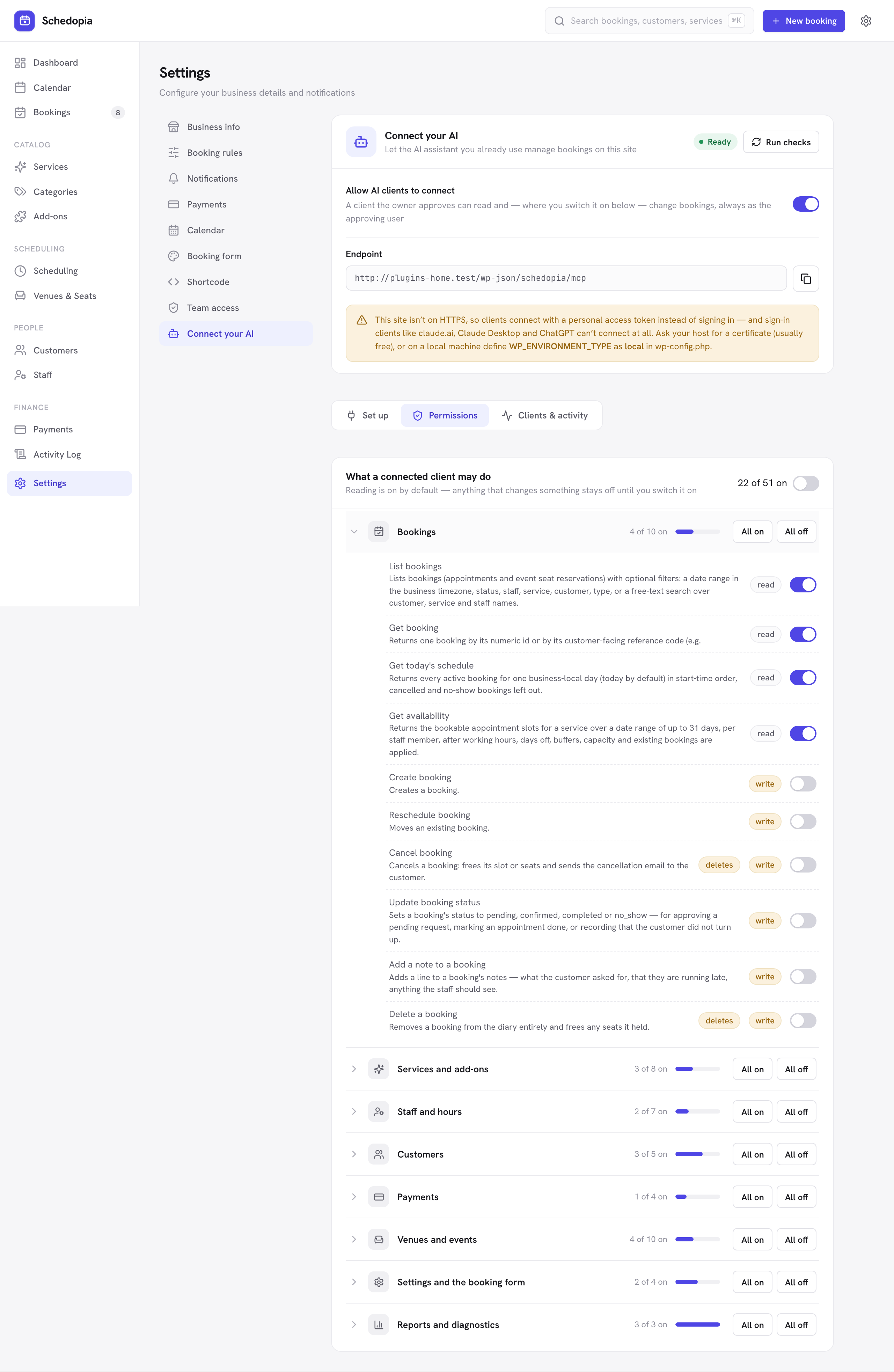
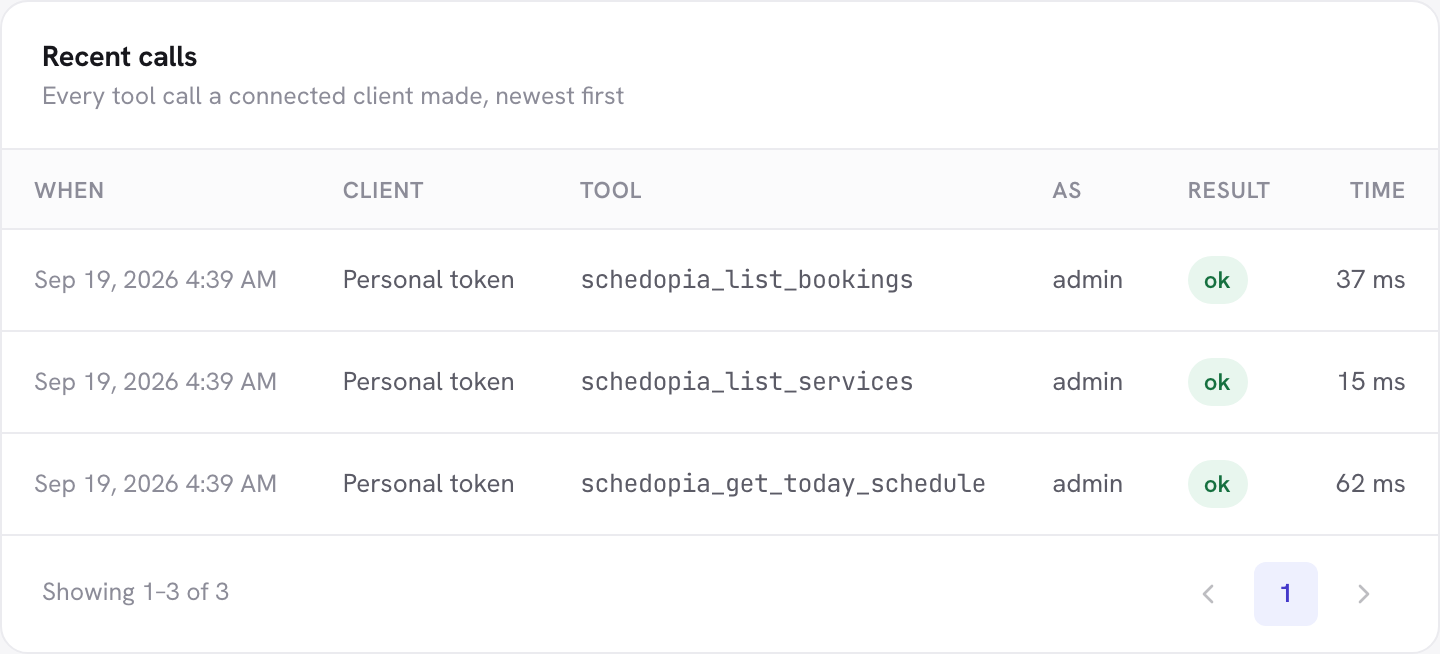
- Logged. Every tool call is listed under Clients & activity, with the client, the tool, whose account it ran as, and whether it worked.
- Your data, your choice of AI company. Schedopia sends nothing to an AI service by itself. What the assistant reads in an answer is seen by the company that makes the assistant you approved, so if customer records should never leave your site, leave the customer tools off.
The Connect your AI docs walk through connecting each assistant, and What your assistant can do lists all 51 tools with what each one changes.
What Schedopia’s AI won’t do
Schedopia’s AI connection is a way for you to run your bookings, not a way for customers to make them, as of version 1.5.1.
- No chatbot for customers. Customers book through the booking form. Booking by chatting on your website or on WhatsApp is planned for Schedopia Pro, which isn’t on sale yet.
- No phone answering. Calls still come to you.
- No no-show prediction. Also planned for Pro.
- The assistant is only as careful as the model. Schedopia stops an assistant from booking a time that isn’t free; it can’t stop one from moving the wrong Sam. Check what it says it’s about to do before you agree, and leave the tools tagged deletes off unless you need them.
- You bring the assistant. Schedopia is free, but ChatGPT, Claude and the rest are someone else’s product, with their own plans and prices.
- WordPress 6.9 or newer. The AI connection uses WordPress’s Abilities API, which arrived in 6.9; the rest of Schedopia runs on 6.5 and up.
If you want an AI that answers your phone or chats with customers on your website today, a tool built for that will suit you better, and the six questions above are the way to judge it.
Where to start
Today, ask whichever AI tool you’re considering, or already use, the first of the six questions: does a booking it makes go through the same checks as your booking form? If you run Schedopia on WordPress 6.9, switch on Connect your AI under Settings, connect your assistant with only the read tools on, and ask it “What’s on tomorrow?” Check the answer against your calendar before you switch on anything that writes. The launch post has more on why we built the AI connection the way we did.
Frequently Asked Questions
What is AI appointment scheduling?
AI appointment scheduling is the use of an AI model, the technology behind ChatGPT and Claude, to take, change or look up bookings in plain language instead of through a booking form or an admin screen. It shows up as website chatbots, AI phone receptionists, assistants for the business owner and no-show predictions.
Can AI book appointments for my business?
Yes. It is safest when the AI books through a booking system that checks availability and double bookings on every booking, so the AI can ask for a time but can't hand out one that isn't free.
Can an AI chatbot double-book appointments?
Yes, if it writes to a calendar without checking it first, or answers from what it remembers instead of looking the time up. A chatbot connected to a booking system that re-checks each booking can't promise the same slot twice.
Will AI replace online booking forms?
Not for most small businesses. A booking form that lists only free times is already the quickest way to pick a slot. AI is more useful for answering questions and for the owner's admin than for choosing 2:00 PM.
Can AI predict which customers won't show up?
Not reliably from one small business's own history, which is too short to learn much from. Reminders, a clear cancellation cut-off and deposits do more for a small business today. Schedopia doesn't predict no-shows as of version 1.5.1; it's planned for Schedopia Pro.
Does Schedopia use AI?
Yes, on the owner's side. Since version 1.4.0, Schedopia lets you connect an AI assistant such as ChatGPT or Claude through MCP and run bookings, services, staff hours and more by asking in plain language. It has no customer-facing chatbot.
Which AI assistants work with Schedopia?
Any assistant that supports MCP custom connectors, including ChatGPT, Claude, Claude Desktop, Claude Code, Cursor and Codex. Schedopia's AI connection needs WordPress 6.9 or newer, and it is off until you switch it on.
Is my customer data sent to the AI company?
Only what the assistant reads. Schedopia doesn't send your bookings anywhere; your assistant asks your site for what it needs, and the answer is seen by the company that makes that assistant. Leave the customer tools switched off if customer records should never leave your site.