Reserved Seating vs. General Admission: Which Is Better for Your Event?
Reserved seating vs general admission: when a seat number sells better, when an open room holds more people, and how to choose for a theater, hall or class.

The hall is booked, the date is set and the poster is printed. Then comes the question of reserved seating vs general admission: do people get a seat number, or do they take whatever is free when they walk in?
Most small organizers pick general admission because it sounds like less work. There’s no map to draw, no seat numbers to check and no ticketing platform to set up. For a standing gig or a drop-in class, that instinct is right. For a seated show where the front row and the back row are different evenings, it costs more than it saves: a queue at the door an hour early, groups split up, and every seat sold at one price whatever the view.
We build Schedopia, a free WordPress plugin that sells reserved seats, so we have a stake in this. Most of what follows holds whichever tool you use. Our view is short: if the seats differ, sell them as different seats. General admission is for rooms where people stand, or where every spot is as good as the next.
What is the difference between reserved seating and general admission?
Reserved seating gives every ticket a specific seat, chosen when it’s booked. General admission sells entry to the room, and people take any open spot when they arrive. General admission comes in two kinds: standing room, as at a club gig, and open seating, where chairs are set out first come, first served.
| Reserved seating | General admission | |
|---|---|---|
| Who picks the spot | The buyer, when booking | Whoever arrives first |
| Price | Can differ by section or seat | Usually one price |
| Groups | Book seats side by side | Hope to find a gap together |
| Arrival | Any time before the start | Early, for a good spot |
| Capacity | One person per chair | Highest when people stand |
| Setup | A seat map, drawn once | A headcount |
Reserved seating vs general admission: the case for a seat number
Reserved seating wins whenever the seats aren’t equal, because people will pay for, and plan around, a seat they chose.
The clearest evidence comes from outside events. Southwest Airlines let passengers sit anywhere for decades, then announced on July 25, 2024 that it would assign seats. Its research found that 80% of its customers, and 86% of potential customers, prefer an assigned seat, and that customers who left for another airline named open seating as the number one reason (checked on November 1, 2026). A plane isn’t a theater, but the preference is the same: people want to know where they’ll sit before they leave home.
For an event, that preference turns into three practical gains:
- You can price the view. The front rows sell at one price and the back rows at another. General admission charges everyone the same, or sells “priority entry” to do the same job with a longer queue.
- Nobody queues early. With a seat number, arriving ten minutes before the start is fine. General admission rewards whoever stands outside longest, which in December is a strange thing to reward.
- Groups sit together. A family of four picks four seats in a row when they book, instead of hoping the room still has four together at 7:55 PM.
When general admission is the better choice
General admission is the better choice when people stand, move around, or sit in spots that are all about as good as each other.
Standing events. Gigs, dance nights and launch parties don’t need seat numbers, and a standing crowd fits more people into the same room. The International Building Code allows 5 net square feet per person for standing space and 7 for chairs that aren’t fixed (IBC 2021, Table 1004.5, checked on November 1, 2026). A hall with 1,400 square feet of clear floor could hold 280 people standing or 200 on chairs. Local codes vary and your fire marshal has the final word, so check the number for your room before you sell.
Flat rooms where every spot is equal. A yoga class, a fitness session or a workshop where people sit wherever they like has no front row worth paying for. A seat map there adds a step to the booking form that answers a question nobody asked.
Free and drop-in events. If most people decide on the day and nothing is being charged, a headcount is all you need.
The strongest case for general admission, answered
The best argument for general admission is that it’s less work: no map to draw, no seat numbers to check at the door, and no ticketing platform taking a cut of every sale.
Most of that work happens once. A seat map is drawn per room, not per event, so the second show in the same hall takes no map work at all. The confirmation email tells each customer their seat, which makes the door a matter of pointing. And the platform doesn’t have to be rented: if your site runs on WordPress, a seat booking plugin can hold the map and take the reservations on your own site, as our seat reservation guide shows step by step.
The real cost is getting the map right before the first sale. A sold seat has to stay the seat that was sold, so the layout you publish is the layout you live with.
What you give up with reserved seating
Reserved seating has costs, and they’re worth knowing before you choose it.
- Single empty seats. Couples book pairs, and pairs leave odd single seats between them. A general admission crowd closes those gaps by itself; a seat map leaves them for you to sell at the door or by phone.
- Fewer people per room. If the event could run standing, chairs cost you capacity, as the numbers above show.
- Less room to change your mind. Moving the stage or adding an aisle after tickets are sold means moving people who chose their seats.
- Restaurant-style tables. Galas and dinners seated around round tables are a different problem from rows. Some seat map tools draw tables; many, including ours, draw rows.
How Schedopia handles reserved seating and general admission
Schedopia, a free, self-hosted WordPress booking plugin, sells reserved seating as events and handles unseated sessions as services with a capacity.
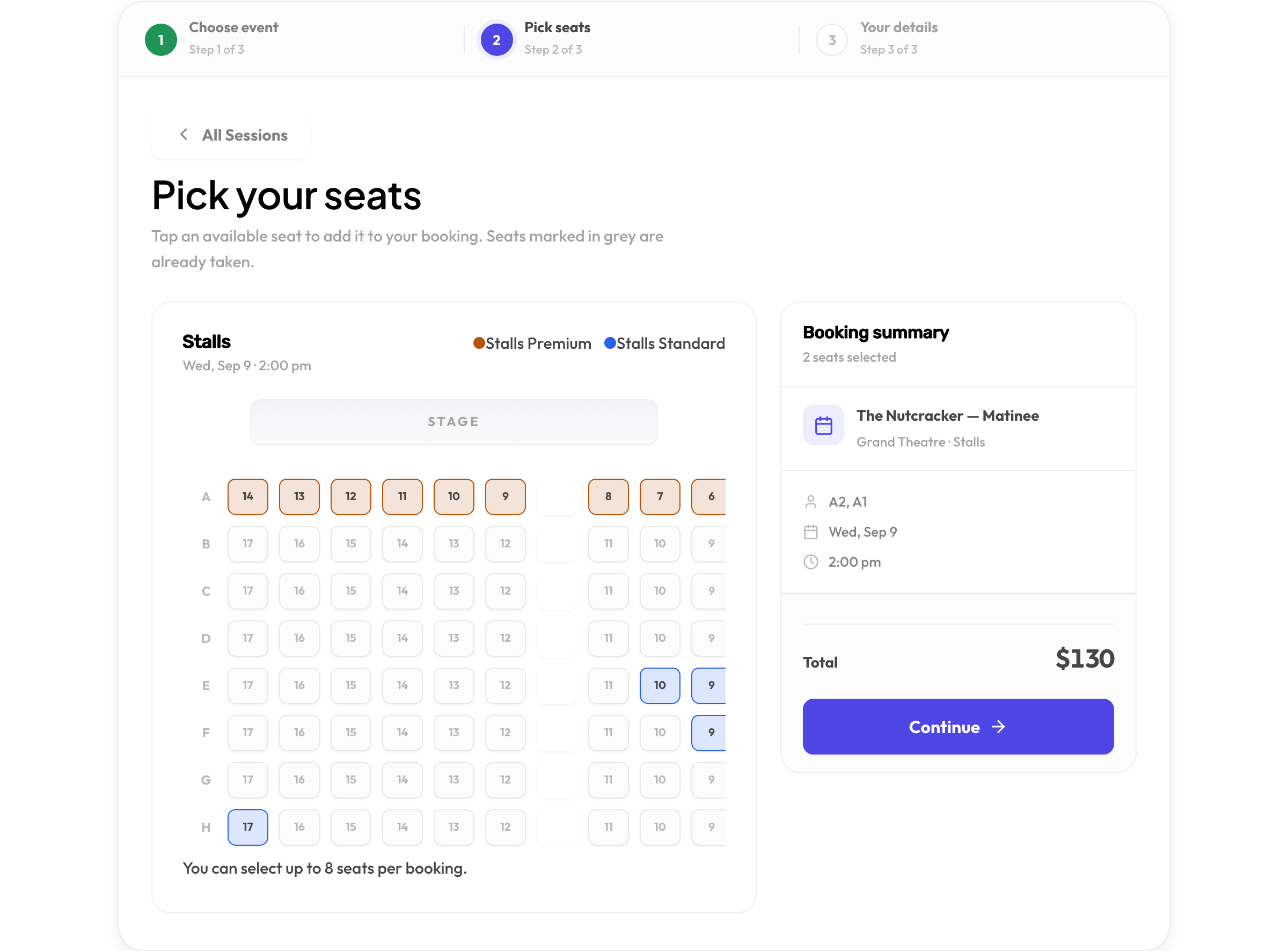
For reserved seating, you draw each hall once as a seat map, then group seats into tiers such as Premium and Standard, each with its own color and price. Any single seat can have its own price too. Customers choose up to eight seats in one booking, and Schedopia checks every reservation inside a database transaction, so two people clicking the same seat at the same moment can’t both get it. The event list shows seats left, a “from” price and Fully booked once everything has gone.
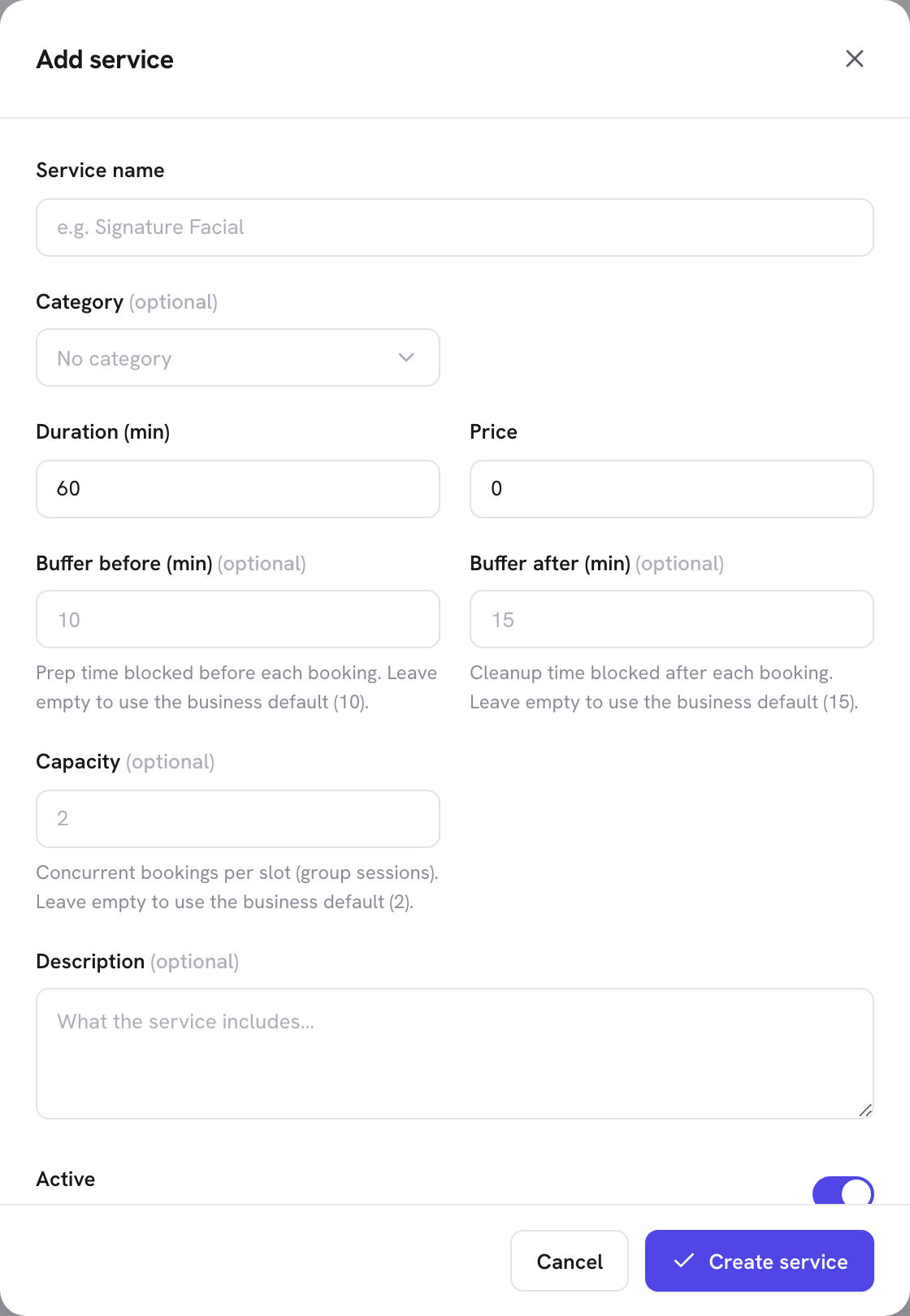
General admission works differently. As of version 1.5.1, Schedopia has no unseated event type: every event needs a hall with a seat map. For a class, a workshop or any session where people take any spot, create a service and set its Capacity, the number of bookings one time slot can take. The booking form stops offering the time once it’s full.
Two limits are worth knowing up front. The public booking form takes one place per service booking, with no “how many people” field, so each person in a group books their own place. And the free plugin has no online card checkout: customers pay in cash or by bank transfer, and you record the payment against the booking.
Where to start
Look at your room, or a photo of it, and ask one question: would anyone pay more to sit in the front row? If the answer is yes, draw the map and sell reserved seats. If the answer is no, sell places in a session with a capacity, or let people stand.
Schedopia is free on WordPress.org. Install it, draw one hall in the seat planner and put a test event on sale, or set up a service with a capacity for an unseated class. The event seating page shows what customers see.
Frequently Asked Questions
Is reserved seating better than general admission?
Yes, for seated events where the view changes from row to row. Customers can choose and pay for the seat they want, groups sit together, and nobody has to queue early. For standing events and rooms where every spot is equally good, general admission is simpler and fits more people.
Does general admission fit more people in the same room?
Yes, when people stand. The International Building Code allows 5 square feet of clear floor per standing person and 7 per person on chairs that aren't fixed, so a standing room holds about 40% more. Your local fire code sets the final number.
Can one event mix reserved seats and general admission?
Yes. Many venues put numbered seats up front and a standing area behind. In Schedopia 1.5.1 an event is seats only, so a standing area would be a separate bookable service with its own capacity.
Can Schedopia sell general admission tickets?
Not as an event. Every Schedopia event uses a seat map. For an unseated session, create a service and set its capacity, and the booking form stops offering the time once it's full.
How many seats can a customer book at once in Schedopia?
Up to eight seats in one booking. The customer picks them on the map, and the booking holds them together under one name.
Is reserved seating more work to run than general admission?
Only at the start. You draw the seat map for a room once and reuse it for every event in that room. After that, prices come from the seat tiers and the booking system stops anyone selling a seat twice.
Can customers pay online for reserved seats in Schedopia?
Not in the free plugin as of version 1.5.1. Customers pay in cash or by bank transfer, and you record the payment against the booking so it shows as paid.