FreeSince v1.3.0
Venues, halls and seats
Events happen somewhere. Under Venues & Seats you describe that somewhere once — a venue, the halls inside it, and the seats in each hall — and every event you create afterward borrows it.
This screen only appears when your business mode includes events. Pick Events & seats or Both in the setup wizard, or change it later under Settings → Business info.
Venues and halls
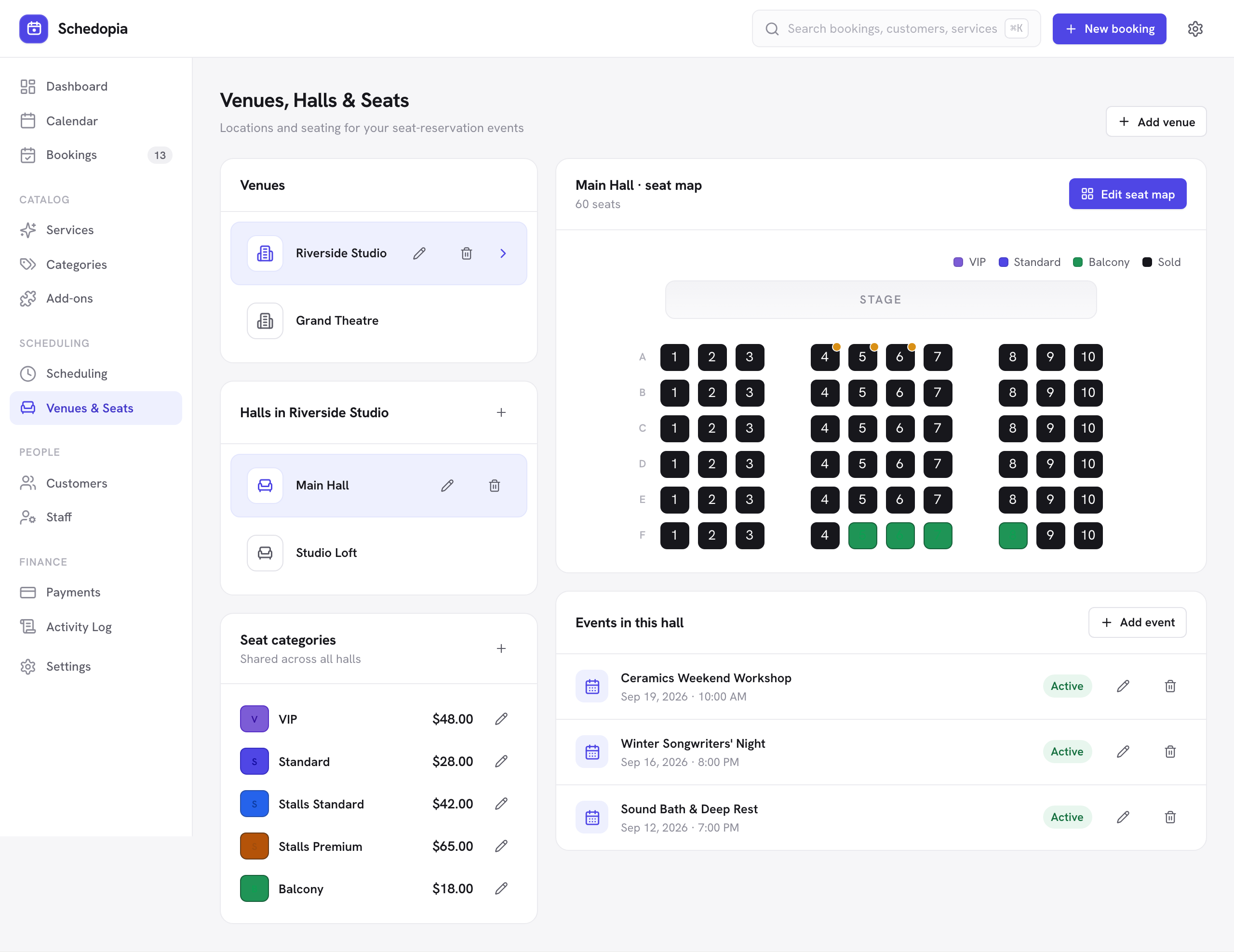
A venue is a location — a studio, a community center, a theater. Each venue holds one or more halls: the rooms people actually sit in. Select a hall and its seat map appears on the right, along with the events that run in it.
You can have as many venues and halls as you like. Deleting a hall deletes its seat map, and deleting a venue deletes its halls and their seats. Neither is allowed while an event runs there, so nothing disappears from under an event.
The seat planner
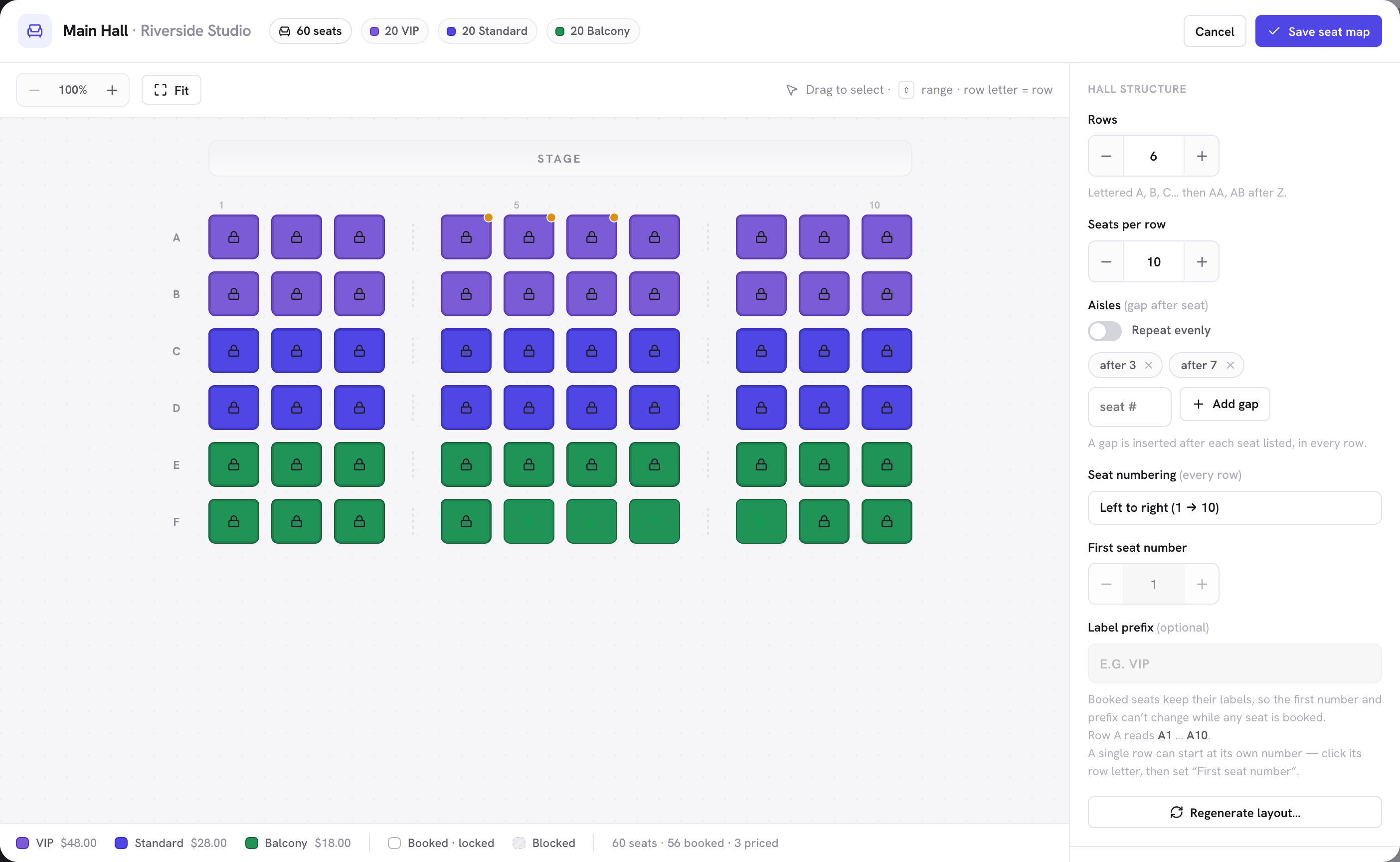
Open a hall and choose Add seat map (it reads Edit seat map once the hall has seats). Set how many rows and how many seats per row, add aisles where you want gaps, and generate the grid. Seats are labeled like a theater — A1, A2 … B1 — and the same layout is what customers see when they pick their seats, so what you draw here is what they get.
Under Seat numbering you can match the way your room is actually numbered: run the numbers right to left instead of left to right (so a row reads 17 … 1 as seen from the stage), start counting from a number other than 1, and add a short prefix to every label, such as VIP-A1. Direction can be changed at any time; the first number and the prefix rename every seat, so they are locked while any seat in the hall has a booking.
A single row can also start at its own number. If your front row is shorter than the rest — a few seats taken out for a walkway or a camera position — it would otherwise keep counting from the hall rule and read A17 … A4 when the room reads A14 … A1. Click the row letter to select the whole row, then set First seat number for that row alone. Use hall rule puts it back. Because a seat’s label is what a customer has reserved, a row is locked while any of its seats is booked.
Individual seats can be switched off (a broken seat, a restricted view) and they show as unavailable everywhere. A seat that already has a reservation for an upcoming event cannot be removed from the map.
Seat tiers and pricing
Seat categories are optional pricing tiers shared across all your halls — VIP, Standard, Balcony, whatever fits. Each has a name, a color and a price. Assign a tier to seats in the planner and they take its color on the map and its price at checkout.
- A seat with no tier is a plain seat: it costs whatever price you give it directly, or nothing if you leave that blank.
- A seat with a tier inherits the tier’s price. Give a seat its own price and that overrides the tier for that one seat — handy for front-row center.
- Changing a tier’s price affects future bookings only. Existing reservations keep the total they were made at.
Next
With a hall laid out, create an event in it.
New to seated events? The event seating overview shows the whole flow, from drawing a hall to a customer picking seats, in one page.