FreeSince v1.0.0
Customizing the form's appearance
The form ships with a clean default look, but it should feel like part of your site rather than a bolted-on widget. The appearance customizer changes its colors, fonts and shapes, and the wording of each step, with a live preview.
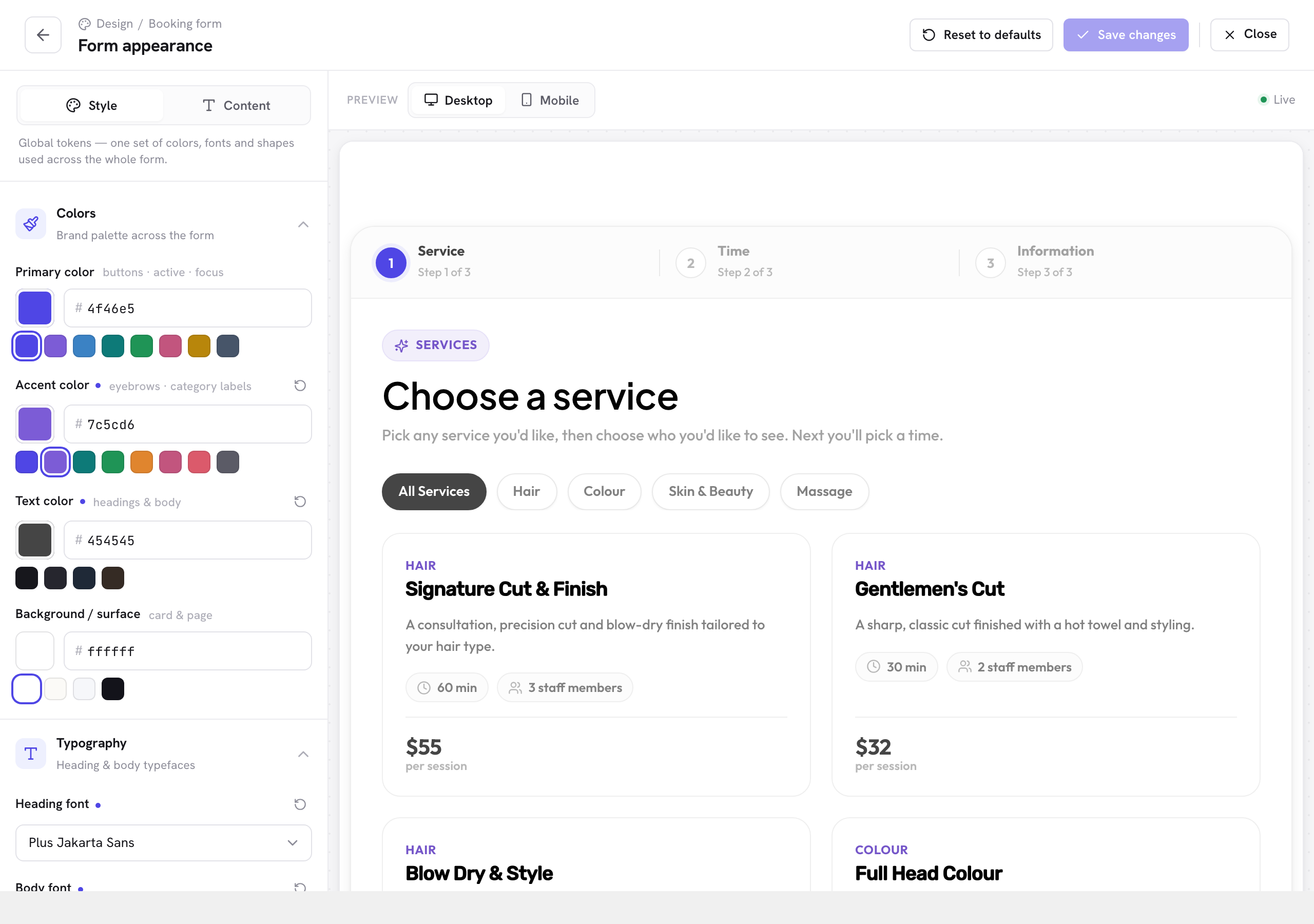
Open it from Schedopia → Design, or from Settings → Design with Customize beside Booking form. The same screen styles the services and events lists. Changes show in the preview immediately and apply everywhere the form appears once you save.
What you can change
| Control | Affects |
|---|---|
| Primary color | Buttons, the active step, focus rings and selected cards. The single highest-impact setting — matching it to your brand color does most of the work. |
| Accent color | Small headings and category labels. |
| Text color and Background / surface | The form’s body text and surfaces, for sitting on a dark or tinted page. |
| Heading font and Body font | Choose from a small set of typefaces, all served from your own server, so no request ever goes to Google Fonts. Or pick Use my theme’s font. |
| Card titles | Whether the titles on service and event cards use your heading font or your body font. |
| Corner radius | From Sharp to Round, to match your theme’s sharpness. |
| Button style | Solid or Outline. |
| Button corners | Rounded or Pill. |
| Cover image height | How tall service and event cover images are on the form. |
Changing the wording
Each step’s heading and helper text can be rewritten. The defaults are generic — “Choose a service” — and a few words of your own voice make the form feel considered:
- “Which treatment would you like?”
- “Who would you like to see?”
- “When suits you best?”
The labels are bounded to the steps that exist, so you cannot accidentally break the flow by editing them.
Tags for your open days
Since 1.5.2, any of the form’s text can use three tags, which fill in from your working hours:
| Tag | Fills in as |
|---|---|
{open_days} |
The days customers can book: “Monday to Friday”, “Saturday and Sunday”, “Monday, Wednesday, and Friday” or “every day” |
{open_day} |
The first open day of the week, such as “Monday” |
{close_day} |
The last open day of the week, such as “Friday” |
The days come from the working hours of every staff member who can be booked, so a day counts as open if anyone works it. Until someone can be booked, your business hours are used. The week starts on the day set under Settings → General in WordPress (Week Starts On).
Under Design → Content, the Time step’s Helper subtext uses a tag by default: “We’re open {open_days}.” If you saved that line unchanged before 1.5.2, when it read “We’re open Monday to Saturday.”, it switches to the new default on its own. If no day is open at all, text with a tag comes out empty, so the form shows no helper line rather than an unfinished sentence.
The live preview
The preview beside the controls updates as you change things, and can be switched between desktop and mobile width. Checking mobile is worth the extra click — most booking traffic arrives on a phone.
Experiment freely. The preview is local to your screen; the live form only changes when you click Save.
Going further with CSS
The customizer covers the common cases. If your theme needs something more specific, the form’s markup uses stable, readable class names and its colors come from CSS custom properties, so a few lines of theme CSS can override anything without fighting the plugin.
Pro will add deeper form customization, including custom field types and conditional logic that shows fields based on earlier answers. Pro is not on sale yet.