Automated vs. Manual Appointment Scheduling: Pros and Cons
Automated appointment scheduling vs doing it by hand: the real pros and cons of each, when manual still wins, and how to automate the routine and keep judgment.

A receptionist who has worked the desk for ten years knows that Mrs Patel’s “quick trim” is really 90 minutes, that Daniel needs the room with the basin, and that the last Friday slot should go to a regular before a stranger. No booking form knows any of that. It’s the best argument against automated appointment scheduling, and it’s a good one.
It’s also an argument about a small share of bookings. Most of what fills an appointment book is routine: the usual service, the usual length, any free stylist. Those bookings don’t need ten years’ judgment. They need someone free to answer at 9:45 PM, when the receptionist has gone home. So the useful question isn’t automated or manual for the whole business; it’s which bookings need a person’s judgment, and which only need a free slot and a confirmation.
We build Schedopia, a free, self-hosted WordPress booking plugin, so we have a stake, but most of what follows holds whichever system you use. This post sets out what each approach does well and badly, the hybrid most small businesses end up with, and a checklist for deciding when to move.
What is automated appointment scheduling?
Automated appointment scheduling is when customers book themselves from a list of free times that software works out from your hours, services and existing bookings, and the confirmation and reminder emails go out without anyone sending them. Manual scheduling is when a person does each of those steps: takes the request by phone, message or at the desk, checks the appointment book, offers a time, writes it in and remembers to send a reminder.
| Manual scheduling | Automated scheduling | |
|---|---|---|
| Who finds a free time | A person, checking an appointment book | Software, from your hours and bookings |
| When customers can book | When someone answers | Any time |
| Double bookings | Avoided if one person writes in one appointment book | Checked as each booking is saved |
| Reminders | Sent if someone remembers | Sent for every booking |
| Judgment about the booking | On every one | None, unless a person approves it |
| Cost | Staff time on every booking | Set-up time, plus a fee for hosted tools |
| Records | Whatever was written down | Every booking, searchable |
Pros and cons of manual scheduling
Manual scheduling is strongest where each booking needs a decision, and weakest where bookings need someone to be free.
The pros:
- Judgment on every booking. A person spots the 90-minute “trim,” gives the regular the Friday slot and knows which room a treatment needs.
- A conversation. A call is a chance to answer questions, suggest the right service and hear that a customer is nervous before they arrive.
- Nothing to set up. An appointment book and a phone work on day one, with no services, durations or hours to enter first.
- Rules that bend. You can squeeze in a regular at 6:15 PM or skip a buffer when you know the room is ready.
The cons:
- It only works when someone answers. Phorest, a salon software company, found that 46% of bookings across more than 5,000 salons and spas were made while the business was closed (reported by HJI in June 2019, checked on October 29, 2026). That’s a vendor’s figure, but it shows how much demand turns up after hours, when a manual schedule can’t take it.
- Every booking costs staff time, usually in the middle of other work. Four minutes a call, fifteen calls a day, is an hour.
- More than one person means more than one schedule. A booking taken on the phone and another taken by message can land on the same slot, and nobody knows until both customers arrive.
- Reminders and records depend on memory. In a busy week, the reminders don’t go out, and nobody adds up which services sell.
Pros and cons of automated appointment scheduling
Automated appointment scheduling is strongest on volume and availability, and weakest on anything a booking form can’t ask.
The pros:
- Bookings while you’re closed or busy. The form takes the 9:45 PM booking and the one that comes in while you’re with a customer.
- No staff time per booking. The routine calls go away, and the phone keeps the questions that need a person.
- The same rules every time. Buffers, minimum notice and the double-booking check are applied to every booking, including the ones made at the same moment.
- Reminders and records by default. Every booking gets a reminder, and every booking is a record you can search, count and export.
The cons:
- No judgment. A form books exactly what the customer picks. If they choose a 30-minute trim for a 90-minute job, the schedule says 30 minutes, and the slot goes to whoever clicks first, regular or not.
- Set-up and upkeep. Expect an afternoon to enter services, durations, staff and hours, and a few minutes every time hours change. A system that doesn’t know about your holiday will sell it.
- Some customers won’t use it. They’ll still phone, so the phone doesn’t disappear; it gets quieter.
- Cost. Hosted booking services usually charge a monthly fee or a fee per booking. A self-hosted plugin is free, but runs on a website you have to look after; the case for self-hosted booking weighs that up.
The hybrid most small businesses end up with
Most small businesses do best automating the routine bookings and keeping a person on the ones that need judgment. The four ways to split the work are not either-or; most businesses use two or three.
- Routine services online, consultative ones by phone. Cuts, blow-dries and standard massages go on the booking form. Color corrections, bridal trials and first consultations say “call us,” because the conversation is the point.
- Approve before confirming. Customers pick a time online, but the booking waits as pending until someone looks at it. The trade-off is speed: a customer who asked at 9:45 PM has nothing confirmed, so approve the same day or they’ll book somewhere that answers.
- Phone bookings into the same system. Bookings taken at the desk or on the phone go into the booking system, not a paper appointment book beside it, so an online booking and a phone booking can never take the same slot.
- Rules that leave room for a person. A minimum notice of a few hours means you see each booking before it happens. A cancellation cut-off lets customers cancel online early and makes them call you late.
The booking cutoff post covers how to choose those two numbers so they agree with each other.
When to switch from manual scheduling
Move to automated scheduling when two or more of these are true:
- You miss booking calls or messages while you’re working, or after you close.
- Booking calls and messages take more than half an hour a day.
- More than one person takes bookings, in more than one place.
- You’ve had a double booking in the last three months.
- Reminders go out by hand, or not at all, and no-shows are costing you.
- Most bookings are the same handful of services.
Stay manual, or mostly manual, if you take a handful of bookings a week, most of them need a conversation first, and you rarely miss a call. Automating a schedule like that saves little, and the set-up time is real.
How Schedopia handles the hybrid
Schedopia automates booking by default and gives you four controls for keeping a person involved, as of version 1.5.1.
Limit the public form to routine services. The booking form shortcode takes a list of services or a category, so [schedopia_booking category="hair"] on your booking page offers only those services online. Services you leave off it stay in Schedopia, and you book them for customers from the admin, as long as no other page on your site carries an unrestricted booking form or services list.
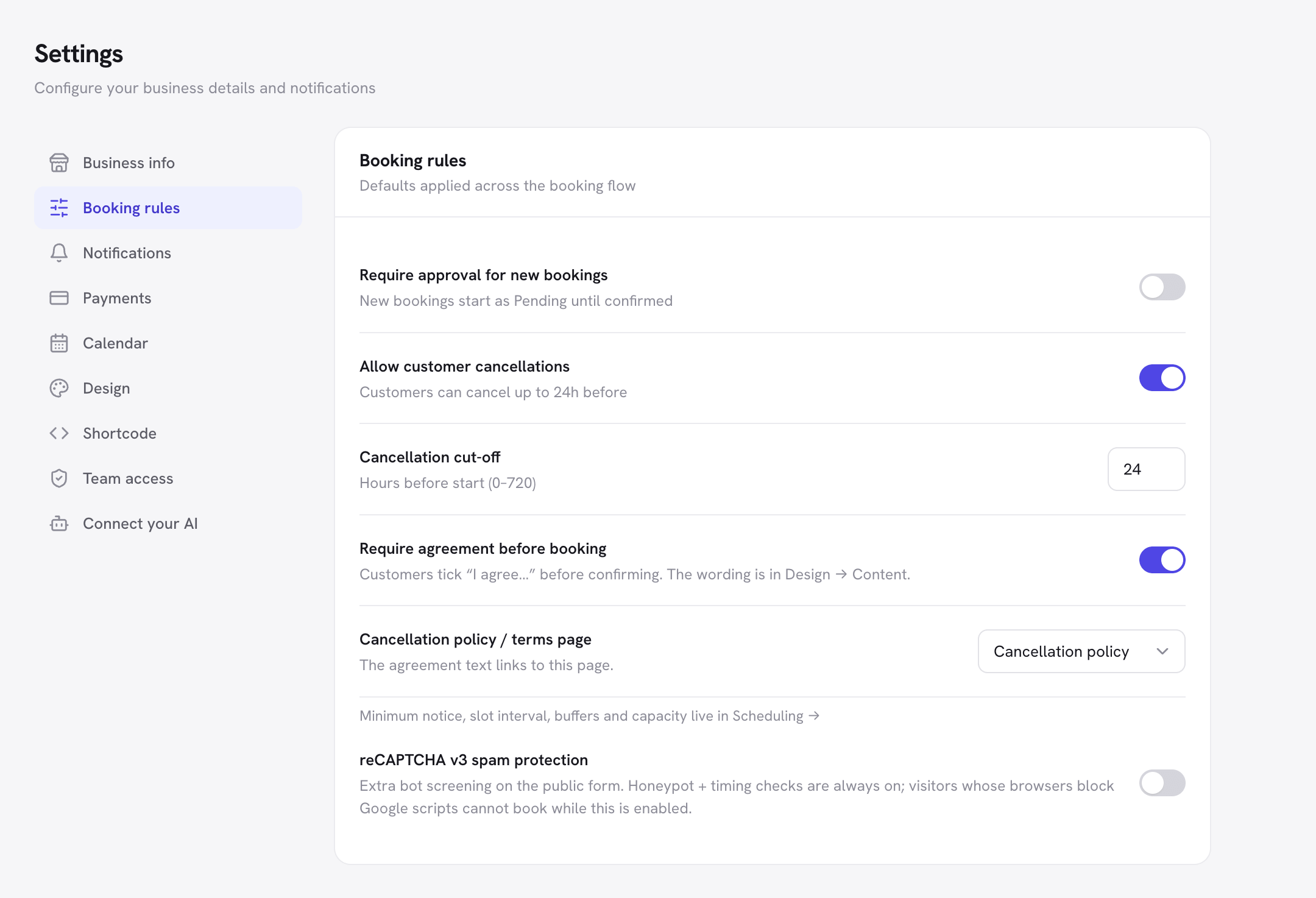
Require approval. Require approval for new bookings, under Settings → Booking rules, makes every booking from the form wait as Pending. The customer gets a request-received email straight away, and the confirmation when you confirm it. It’s off by default.
Enter phone bookings in the same schedule. New booking in the admin takes phone and walk-in bookings, checked against the same availability as the form, so a manual booking can’t land on a slot someone has just booked online. You choose its status, so a phone booking can be confirmed straight away even when online bookings need approval.
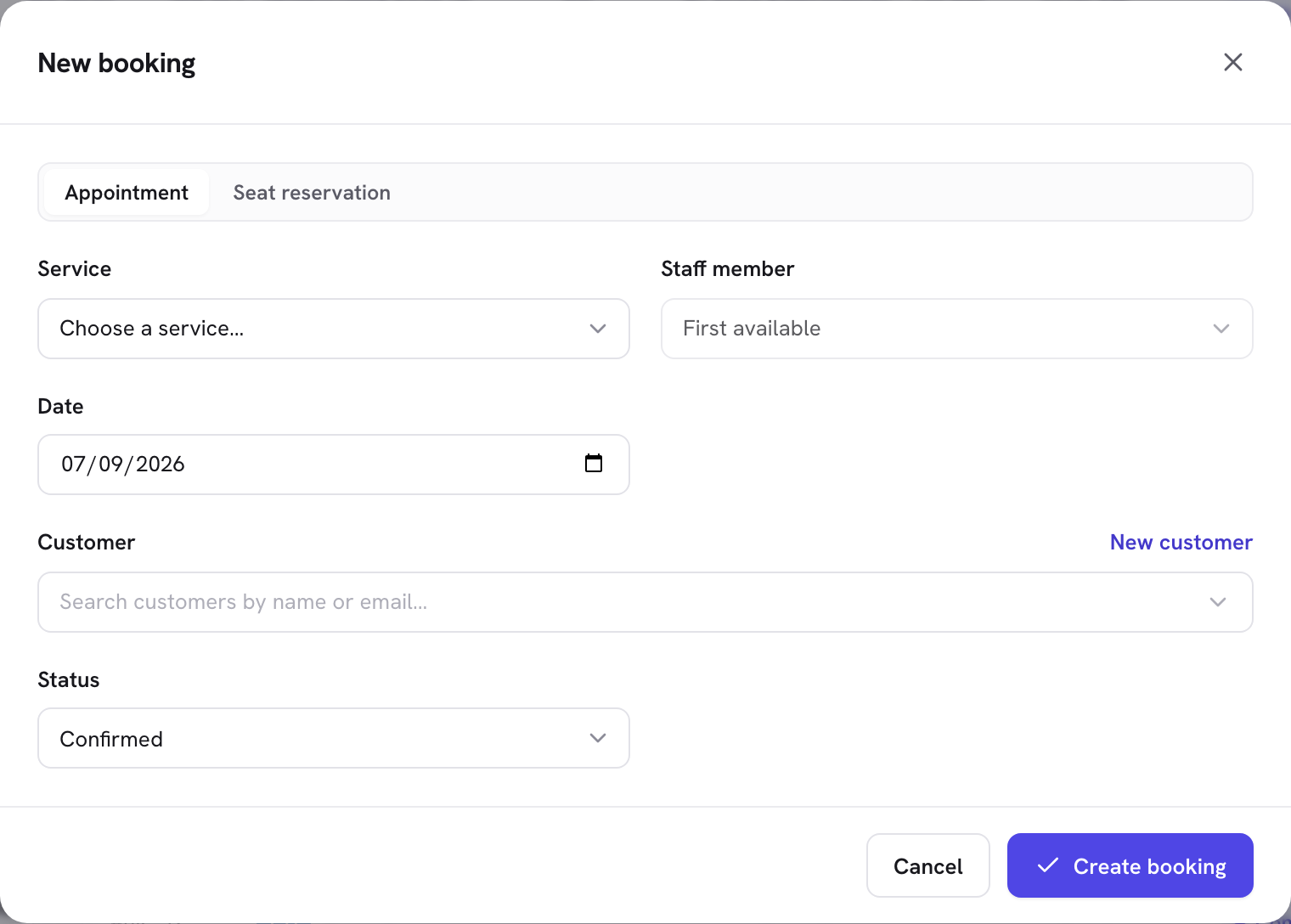
Set the rules that leave room. Minimum notice, under Scheduling, stops online bookings closer than a set time to the start. The cancellation cut-off decides how late customers can cancel from their email, from 0 to 720 hours, and Allow customer cancellations can be switched off so every cancellation comes through you.
What Schedopia’s automation won’t do
Schedopia’s controls are site-wide switches more than fine-grained rules, as of version 1.5.1. These are the gaps a hybrid runs into:
- Approval is all or nothing. You can’t require approval for color work and let cuts confirm themselves. Limiting the form to routine services is the workaround.
- One minimum notice for everything. A two-hour color and a bang trim share the same notice.
- No screening questions. The form asks for contact details and has a notes box; it can’t ask “have you had color in the last six weeks?” before offering a time.
- No priority for regulars and no waiting list. The first person to pick a slot gets it.
- No online deposits, SMS reminders or recurring bookings. Online payment is planned for Schedopia Pro, which isn’t on sale yet.
If your bookings need screening questions, per-service approval or deposits before they’re confirmed, a booking tool with those rules will suit you better today.
Where to start
Today, go through last week’s appointments and mark each booking R for routine or J for needed judgment. If most are R, put those services on a booking form first and keep the J services on the phone, entering them into the same system. For the rest of the set-up, the complete guide to WordPress appointment booking takes it step by step.
Frequently Asked Questions
What is automated appointment scheduling?
Automated appointment scheduling is when customers book themselves from a list of free times that software works out from your hours, services and existing bookings, and the confirmation and reminder emails go out without anyone sending them.
Is automated scheduling better than manual scheduling?
For routine bookings, yes: it takes bookings while you're closed or busy, checks for double bookings every time and sends every reminder. Manual scheduling is still better for bookings that need a decision, such as a color correction or a first consultation.
What are the disadvantages of automated appointment scheduling?
It has no judgment, so it books whatever the customer picks; it takes an afternoon to set up and needs your hours kept accurate; some customers won't use it; and hosted tools charge a monthly or per-booking fee.
When should a small business stop scheduling appointments manually?
When two or more of these are true: you miss booking calls while working or after hours, booking calls take over half an hour a day, more than one person takes bookings, you've had a recent double booking, or reminders are sent by hand or not at all.
Can I use automated and manual scheduling together?
Yes, and most small businesses should. Put routine services online, keep services that need a conversation on the phone, and enter phone bookings into the same system so the two can't clash.
Can I approve online bookings before they're confirmed?
Yes, in most booking systems. In Schedopia, switching on Require approval for new bookings makes every form booking wait as Pending, with a request-received email to the customer, until you confirm it.
Does automated scheduling lose the personal touch?
Not where it matters. The personal touch is in the appointment, not in the phone call to book it. Where a booking does need a conversation, keep that service on the phone or approve online bookings before they're confirmed.