Booking Cutoff Times Explained: Lead Times and Minimum Notice
A booking cutoff time stops bookings you can't prepare for. How lead time and minimum notice work, how much to require, and how to set one in WordPress.

A customer books a 10:00 AM facial at 9:52. The therapist is with someone else, the treatment room is still set up from the last client, and the new-booking email has landed in an inbox nobody will open until lunch. At 10:00 the customer is at the desk with a confirmation on their phone. That is what a booking form with no booking cutoff time does on a busy morning.
The fix is a cutoff: a rule that stops online bookings some time before each appointment starts. Most owners picture it as a time on the clock, like “no bookings after 6 PM for tomorrow.” Booking systems don’t count that way. They count a rolling number of hours back from each start time, so the same setting closes different times for a customer booking at 8 AM and one booking at 9:30 PM.
So pick the number by what it closes at the hours your customers actually book, not by how it sounds. We build Schedopia, a free, self-hosted WordPress booking plugin, and most of what follows holds for any plugin. This post covers what the terms mean, how a cutoff behaves through the day, how much notice to require, the cancellation rule that has to agree with it, and how to set it in Schedopia 1.5.1. For the wider picture, see the complete guide to WordPress appointment booking.
What is a booking cutoff time?
A booking cutoff time is the latest point before an appointment at which customers can still book it online. Booking systems usually set it as a minimum notice, such as 4 hours, so a 2:00 PM appointment stops being offered at 10:00 AM.
Several names get used for the same handful of rules:
| Term | What it means | In Schedopia |
|---|---|---|
| Booking cutoff time | The latest point an appointment can be booked online | Minimum notice |
| Minimum notice | The setting most booking tools use for the cutoff | Minimum notice, under Scheduling |
| Lead time | The gap between making a booking and the appointment | What minimum notice sets a floor for |
| Cancellation cutoff | The latest point a customer can cancel online | Cancellation cut-off, under Booking rules |
| Booking window | How far ahead the calendar is open | Today and the next 14 days |
This post is about the near end of the calendar: how late customers can book. The far end, how many weeks ahead they can book, has its own trade-offs, covered in how far in advance customers should be allowed to book.
How a minimum notice closes times through the day
A minimum notice counts clock hours from the moment the customer opens the booking form, including the hours you’re closed. Here is what three common settings leave open for a salon working 9:00 AM to 6:00 PM, with appointments on the hour:
| Customer opens the form | 4 hours’ notice | 12 hours’ notice | 1 day’s notice |
|---|---|---|---|
| Monday 8:15 AM | Monday 1:00 PM | Tuesday 9:00 AM | Tuesday 9:00 AM |
| Monday 2:30 PM | Tuesday 9:00 AM | Tuesday 9:00 AM | Tuesday 3:00 PM |
| Monday 9:30 PM | Tuesday 9:00 AM | Tuesday 10:00 AM | Wednesday 9:00 AM |
Two things in that table catch people out.
Overnight hours count. Four hours’ notice at 9:30 PM lets someone take Tuesday’s 9:00 AM slot, because the notice ran out at 1:30 AM. If the point of the notice is time to see the booking and prepare, an evening booking for first thing gives you only what’s left between opening and the appointment. Either check new bookings before you open, or choose a notice that still covers the first slot of the day.
“1 day” doesn’t mean “next day.” One day’s notice is 24 hours, not “anything from tomorrow.” It does stop same-day bookings, but at 2:30 PM it also closes Tuesday morning, and at 9:30 PM it closes all of Tuesday. If you only wanted to stop same-day bookings, 12 hours comes closer for a business that’s open in the day.
How much minimum notice should you require?
Minimum notice should be long enough for someone to see the booking and be ready for it, which for most small appointment businesses is between 2 and 24 hours. Four questions decide where you sit in that range.
- Who sees new bookings, and how quickly? If the new-booking email goes to an inbox you check between clients, a booking made at 9:58 for 10:00 arrives as a surprise. The notice should be at least the longest gap between checks during opening hours.
- What has to happen first? Mixing color, warming a treatment room, reading a client’s notes, buying materials. The notice is that preparation time plus a margin.
- Do you approve bookings by hand? A booking waiting for approval holds its slot until you answer. If you usually take three hours to reply, anything shorter than three hours’ notice lets customers turn up to an appointment you never confirmed.
- Do you travel to the customer? A mobile business needs the journey inside the notice, and usually a day to plan the route.
A minimum notice has a price: every hour of it turns away some same-day demand. A barbershop full of walk-ins loses little by closing online bookings an hour ahead. A massage therapist with a 2:00 PM cancellation loses the chance to fill it from the website at noon. If same-day bookings matter to you, keep the notice short and make sure someone sees the new-booking alert.
These starting points are judgment, not research. Use one for the first month, then adjust: if late bookings keep catching you out, add notice; if the first slots of the day keep going empty, take some away.
| Business | Minimum notice | Why |
|---|---|---|
| Barber, walk-in salon | None to 1 hour | Short jobs, little preparation, same-day demand |
| Hair salon with color | 2 to 4 hours | Color needs mixing and a chair to be free |
| Massage, beauty therapist | 2 to 12 hours | Room set-up; short notice fills cancellations |
| Clinic, consultant | 24 hours | Notes to prepare, often approved by hand |
| Tutor, coach | 12 to 24 hours | Lessons to plan |
| Mobile service | 24 to 48 hours | Travel and route planning |
Make your cancellation cutoff match your booking cutoff
A cancellation cutoff should be no longer than your booking cutoff. Many booking systems let customers cancel online up to a set time before the appointment, and if that time is longer than the minimum notice, a customer can make a booking that is already past its cancellation deadline.
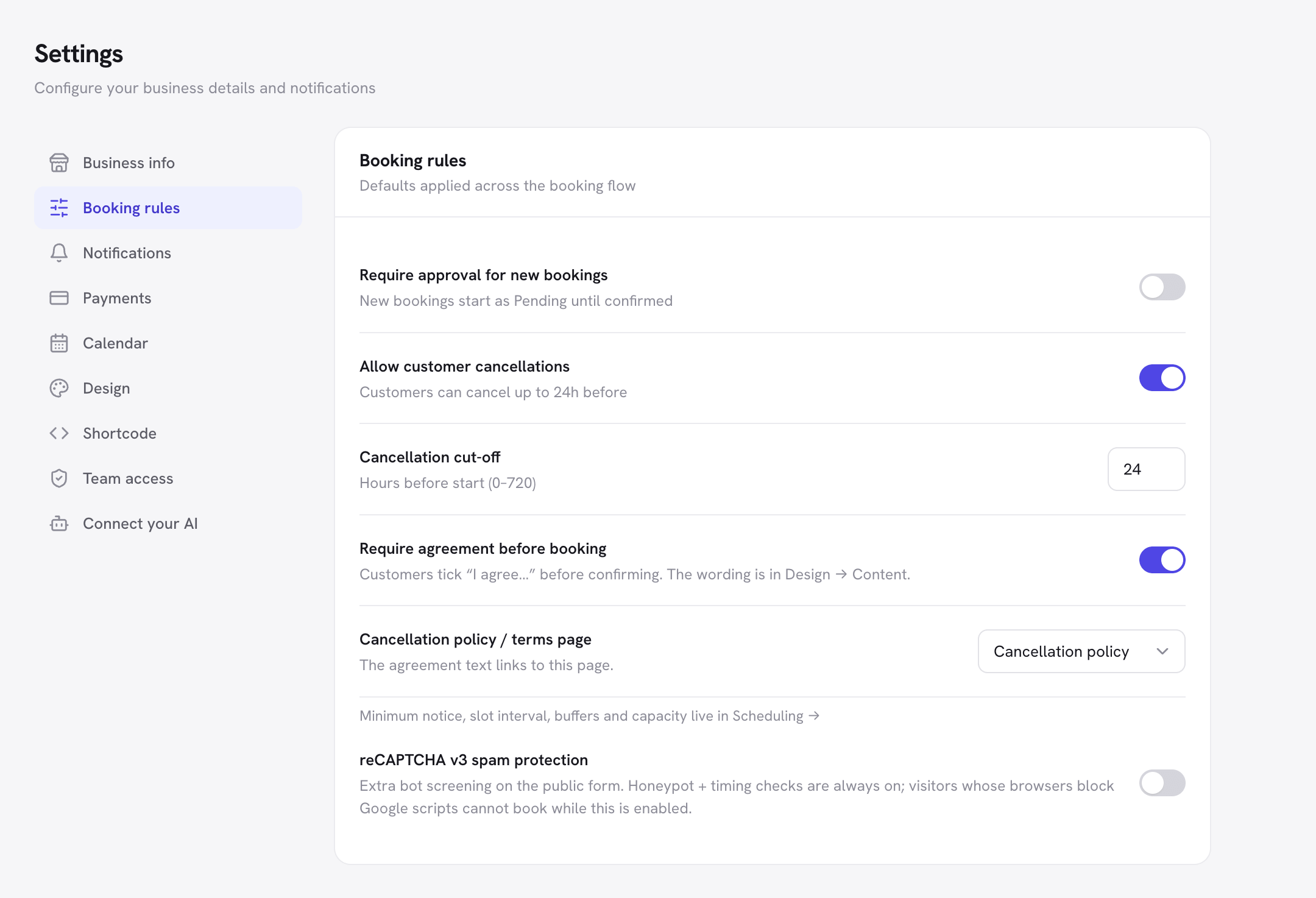
Schedopia’s defaults do exactly this: no minimum notice, and a Cancellation cut-off of 24 hours. Someone who books tomorrow morning’s slot tonight gets a confirmation email whose cancel link opens a page headed “Online cancellation closed,” telling them to contact you instead. The same 24 hours applies to the Cancel button on a customer’s My bookings page.
There are three ways to make the two agree:
- Raise the minimum notice to match the cancellation cut-off, if you can live without the late bookings.
- Shorten the Cancellation cut-off under Settings → Booking rules to the minimum notice or less. It takes any number of hours from 0 to 720.
- Keep both, and say above the form on your booking page that bookings made within 24 hours can’t be canceled online.
How to set a booking cutoff time in Schedopia
In Schedopia, the booking cutoff time is the Minimum notice, one setting for the whole business.
- Go to Schedopia → Scheduling.
- In the Buffers & capacity card, choose Minimum notice: None, 1 hour, 2 hours, 4 hours, 12 hours, 1 day, 2 days or 3 days.
- Click Save changes.
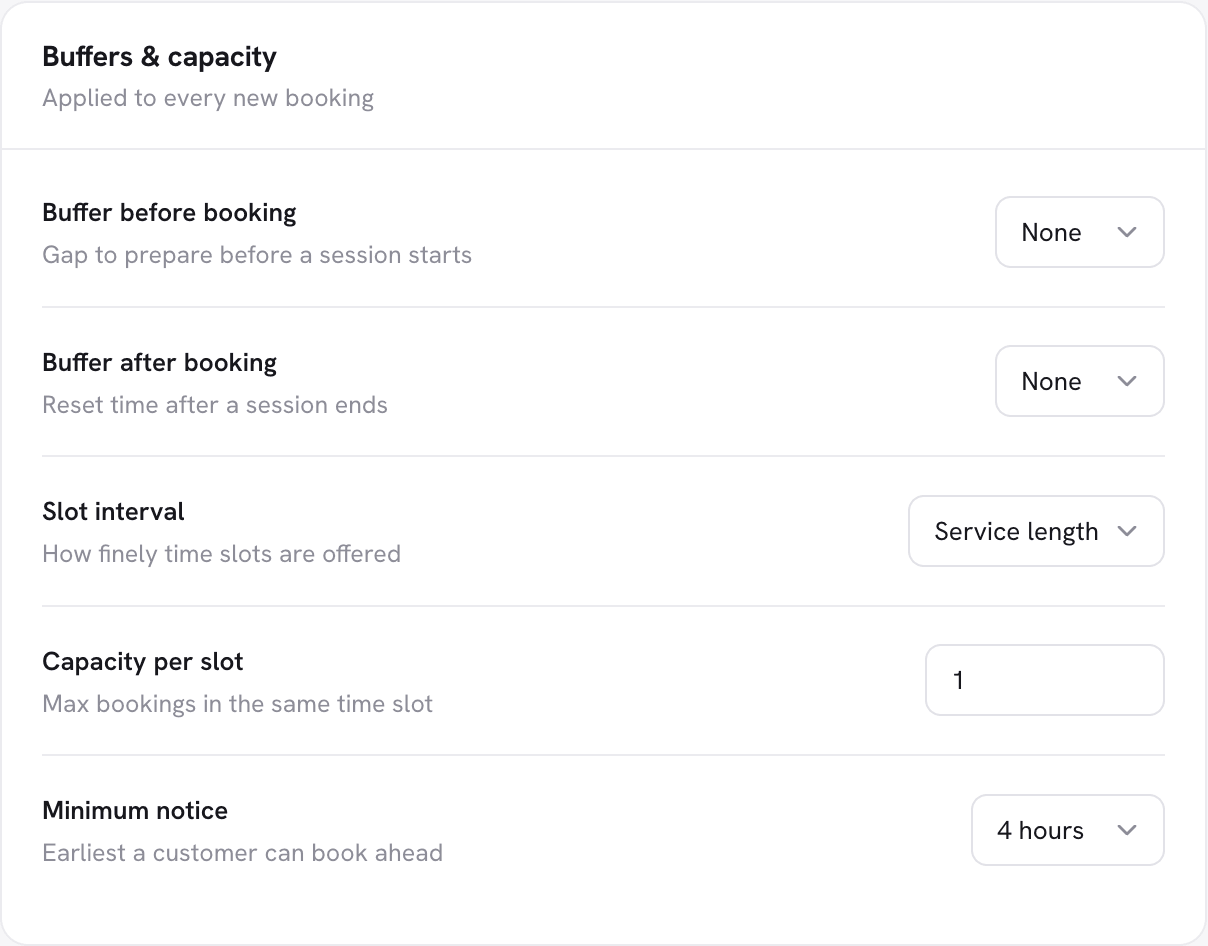
The booking form then stops offering any time that starts inside the notice, so customers never see those times. Schedopia checks the notice again when the booking arrives, so a customer who leaves the form open until their chosen time is too soon is sent back to pick another, with the message “That time is too soon. Please choose a later slot.”
Bookings you add yourself in the admin ignore the notice, so a walk-in or a phone booking for ten minutes’ time still goes in. That’s on purpose: the cutoff exists to stop surprises from the website, not to stop you.
Check the cutoff works
A look at the booking form at a known time shows whether the cutoff closes what you expect.
- Note the time, then open your booking page and pick a service.
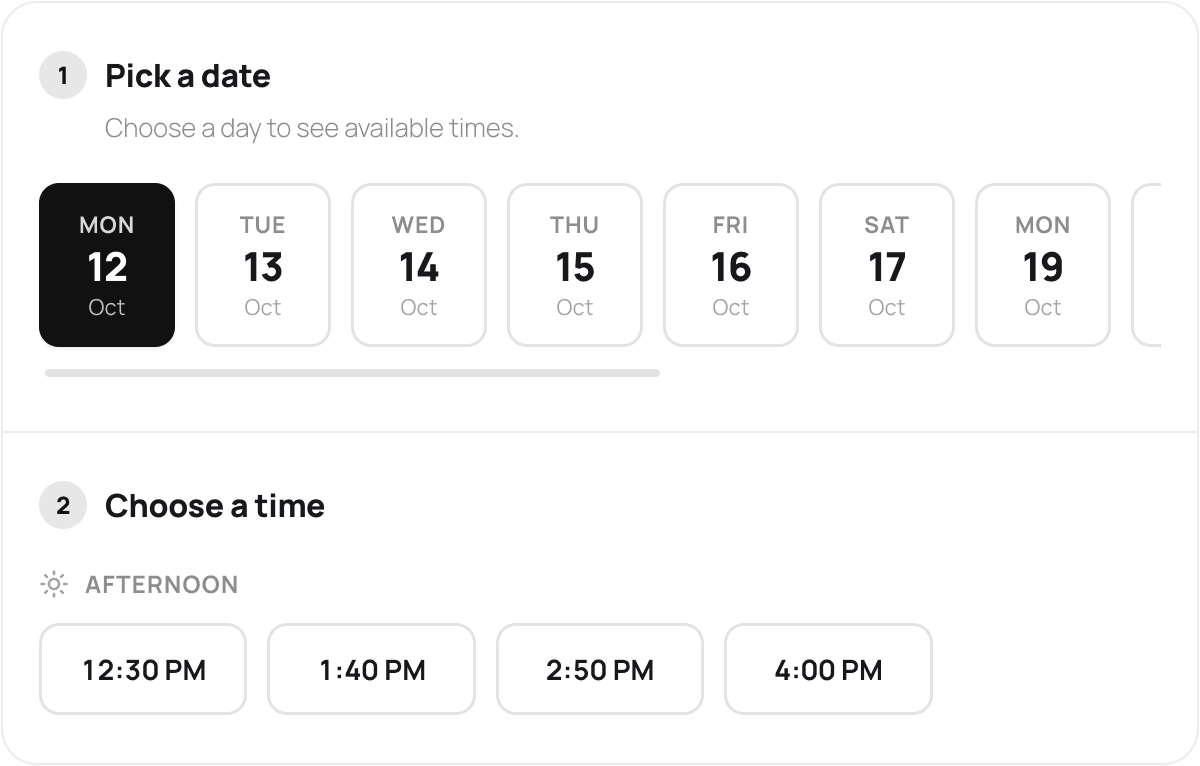
- Choose today in the date strip.
- Check the first time offered. It should be the first slot that starts after now plus your notice.
- If you booked late in the day, look at tomorrow’s first slot too, against the table above.
What Schedopia’s booking cutoff won’t do
Schedopia’s minimum notice covers the common case, one rolling notice for every appointment, and stops there, as of version 1.5.1.
- One notice for every service and staff member. A two-hour color and a bang trim share the same notice. Set it for the service that needs the most preparation.
- No clock-time cutoff. There’s no “bookings for tomorrow close at 6 PM” and no switch for “no same-day bookings.” Choose the rolling notice that comes closest, using the table above.
- Three days at most. The longest minimum notice in the menu is 3 days.
- Events aren’t covered. Minimum notice applies to appointments. Seats at a dated event can be booked online until the event starts.
If you need a different cutoff per service, or bookings to close at a fixed time each evening, a tool with those rules will suit you better today.
Where to start
Today, write down when you’d actually see a booking made at 9:30 PM, and when you’d see one made at 10:00 AM. Set Minimum notice under Schedopia → Scheduling to cover the longer of the two, then open Settings → Booking rules and check the Cancellation cut-off isn’t longer than it. For the rest of the rules that shape which times the form offers, see Scheduling and Cancellations in the docs, or Step 5 of How to Create an Online Booking System in WordPress.
Frequently Asked Questions
What is a booking cutoff time?
A booking cutoff time is the latest point before an appointment at which customers can still book it online. Most booking systems set it as a minimum notice, such as 4 hours, counted back from each appointment's start time.
What is the difference between lead time and minimum notice?
Lead time is the gap between making a booking and the appointment itself. Minimum notice is the shortest lead time you'll accept from online bookings, so a 4-hour minimum notice turns away any booking with less than 4 hours' lead time.
How much notice should customers give for an appointment?
Usually between 2 and 24 hours. The notice should cover the time it takes someone to see a new booking and get ready for it, plus the time it takes to approve it if you confirm bookings by hand.
Does one day's minimum notice mean no same-day bookings?
Yes, and it closes part of the next day too. One day's notice is 24 hours counted from the moment the customer looks, so someone booking at 2:30 PM on Monday is offered nothing before 3:00 PM on Tuesday.
Should I allow same-day bookings?
Yes, if someone watches for new bookings during the day and the service needs little preparation. If new-booking emails sit unread until lunch, set a minimum notice longer than the gap between checks.
Should my cancellation cutoff match my booking cutoff?
Yes, or be shorter. A cancellation cutoff longer than your booking cutoff lets customers make bookings that are already too late to cancel online. With Schedopia's defaults, no minimum notice and a 24-hour cancellation cut-off, a booking made tonight for tomorrow morning can't be canceled from its own email.
Can I set a different minimum notice for each service in Schedopia?
No. As of version 1.5.1, Schedopia's minimum notice is one setting for the whole business, under Scheduling. Set it for the service that needs the most preparation.
Does minimum notice stop me booking a walk-in?
No. In Schedopia, minimum notice only applies to the public booking form. Bookings you add yourself in the admin ignore it, so a walk-in or a phone booking for ten minutes' time still goes in.