How Booking Calendar Synchronization Works
Booking calendar synchronization explained: one-way feeds, two-way sync and add-to-calendar links, why synced calendars lag by hours, and why that double-books.

A stylist adds a dentist appointment to their Google Calendar for Thursday at 2:00 PM. Their booking system is “synced with Google Calendar,” so they assume the slot is gone. On Thursday at 2:00 PM there’s a customer in the chair, booked online on Monday. The booking calendar synchronization they set up was real; it just only ran one way.
“Sync” gets used for three different things in booking systems: a calendar feed that copies bookings out, two-way sync that also reads your calendar back, and add-to-calendar links that hand a customer a one-off copy. They look the same from the calendar app and behave very differently. Most double bookings blamed on calendar sync come from expecting one kind to act like another, or from forgetting that a subscribed calendar refreshes hours later, not when the booking is made.
We build Schedopia, a free, self-hosted WordPress booking plugin with a one-way feed and no two-way sync yet, so we have a stake in how this is explained. The mechanics below apply to any booking system.
What is booking calendar synchronization?
Booking calendar synchronization is any arrangement that copies appointments between a booking system and a calendar app such as Google Calendar, Outlook or Apple Calendar, so the same bookings show in both. It comes in three kinds:
| Kind | Direction | How it works | How fast | Blocks booking times? |
|---|---|---|---|---|
| Calendar feed | Booking system to your calendar | Your calendar app re-downloads a file from a private address | When the app gets round to it, often hours | No |
| Two-way sync | Both ways | The booking system connects to your Google or Microsoft account | Much faster, and changes flow both ways | Yes |
| Add-to-calendar link | One booking to the customer’s calendar | The customer clicks a button in an email | Once | No |
Knowing which one you have answers most “why didn’t it sync?” questions before they’re asked.
How a one-way calendar feed works
A calendar feed is a file in the iCalendar format (the .ics format every calendar app reads) that the booking system keeps up to date at a private web address. You paste that address into your calendar app as a subscription (“From URL” in Google Calendar, “Subscribe from web” in Outlook), and the app downloads the file, shows its events, and downloads it again later to pick up changes.
The “later” is set by the calendar app, not the booking system. Microsoft says calendars added in Outlook on the web “sync approximately every four hours” (Microsoft Learn, checked on October 29, 2026). Apple Calendar on a Mac lets you choose the interval for each subscribed calendar under Get Info → Auto-refresh (Apple Support, checked the same day). Google’s help page on adding a calendar by link doesn’t give an interval at all (Google Calendar Help, checked the same day), so plan on hours, not minutes. A feed can suggest how often to check, but the app is free to ignore it.
Two things follow. A feed is for seeing your day in the calendar you already use, not for stopping double bookings. And because the address alone gives access, a feed URL is a password: anyone who has it can read the calendar.
How two-way calendar synchronization works
Two-way calendar synchronization connects the booking system to your calendar account itself, with your permission, so it can read your calendar as well as write to it. Instead of publishing a file and waiting to be fetched, the booking system talks to the calendar provider directly.
With Google Calendar, for example, a booking system can ask for the busy times on a calendar before it offers slots, using Google’s free/busy query, and ask Google to notify it when a calendar changes rather than checking over and over (both checked on October 29, 2026). Microsoft offers the same kind of connection for Outlook. That’s what makes the stylist’s dentist appointment remove the 2:00 PM slot from the booking form.
Two-way sync costs more than a feed in a few ways:
- Each person connects their own account. A team of six means six sign-ins, and a connection that expires or gets revoked quietly stops blocking time.
- The booking system can see your calendar. Many tools only use the free and busy times, but the access is to the account.
- Conflicts need a rule. If a booking is moved in the booking system and the copy in Google Calendar is edited at the same time, one of the two changes has to win.
- Personal and work calendars mix. Every private event on a connected calendar becomes busy time, which is the point, until a reminder to call your mom blocks a slot.
How add-to-calendar links work
An add-to-calendar link gives a customer a one-off copy of their booking in their own calendar. The Google and Outlook buttons open a new event already filled in with the date, time and service; the Apple or .ics button downloads a file the calendar app imports. Either way, the customer’s calendar now holds a copy that the booking system can’t reach.
So if you move or cancel a booking, the copy stays where it was until the customer changes it. The fix is in the emails: the confirmation, reminder or cancellation that goes out after the change tells the customer what’s true now.
Why synced calendars still cause double bookings
Synced calendars cause double bookings when people trust the calendar app more than the booking system. Four causes account for most of them:
- Expecting a feed to work both ways. An event added in Google Calendar doesn’t block anything in a booking system that only publishes a feed.
- Refresh lag. A booking made online at 9:05 AM might not reach Outlook until the afternoon. Someone who checks Outlook at 10:00 AM, sees 11:00 AM free and takes a phone booking for it has double-booked from a calendar that was out of date.
- Booking in the wrong place. A booking typed straight into the calendar app never reaches the booking system, so the booking form keeps offering that time.
- The wrong time zone. If the booking system and the calendar app disagree about your time zone, every event lands an hour or more out.
The rule that prevents all four: make bookings and block time only in the booking system, and use the calendar app for looking.
Which kind of synchronization do you need?
Most small businesses need a feed and add-to-calendar links, and only some need two-way sync. Pick by where your time actually gets decided.
- Your working time lives in the booking system (shifts, breaks and days off are set there): a one-way feed is enough to see bookings next to the rest of your life.
- Your working time lives in Google Calendar or Outlook (a consultant whose meetings, school runs and travel are all in one calendar): two-way sync is worth paying for, because entering every one twice is how double bookings happen.
- Your customers forget appointments: add-to-calendar links in the confirmation and reminder emails, whichever of the above you choose.
How Schedopia handles calendar synchronization
Schedopia has a one-way calendar feed and add-to-calendar buttons, and no two-way sync, as of version 1.5.1.
The calendar feed is off by default. Switch on Enable the feed under Settings → Calendar, copy the feed URL, and subscribe to it in Google Calendar, Outlook or Apple Calendar. Rotate URL issues a new address and stops the old one at once, if it ever leaks.
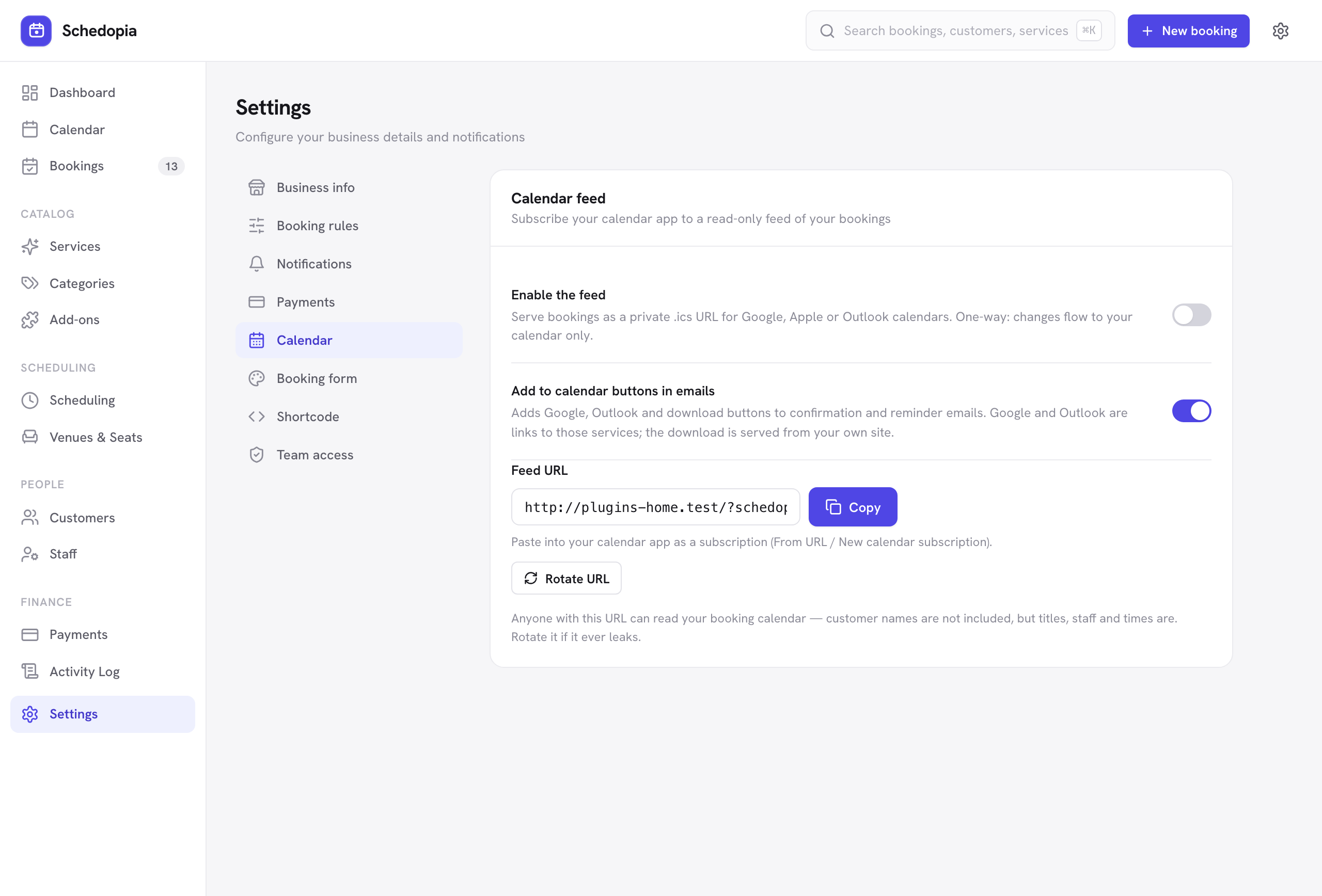
The feed holds one calendar for the whole business, covering pending, confirmed and completed bookings from 30 days back to a year ahead, up to 500 of them. Each event is titled with the service or event, with the booking reference and the staff member in its description. Pending bookings are marked tentative, and canceled bookings drop out at the next refresh. The feed asks calendar apps to check every hour; whether they do is up to them.
Add-to-calendar buttons for Google, Outlook and Apple go in the confirmation and reminder emails. The Apple / .ics file is served from your own site. The Google and Outlook buttons are links to those services, which receive the service, your business name and the staff member’s name if the customer clicks; switch the buttons off under Settings → Calendar if you’d rather not send customers there.
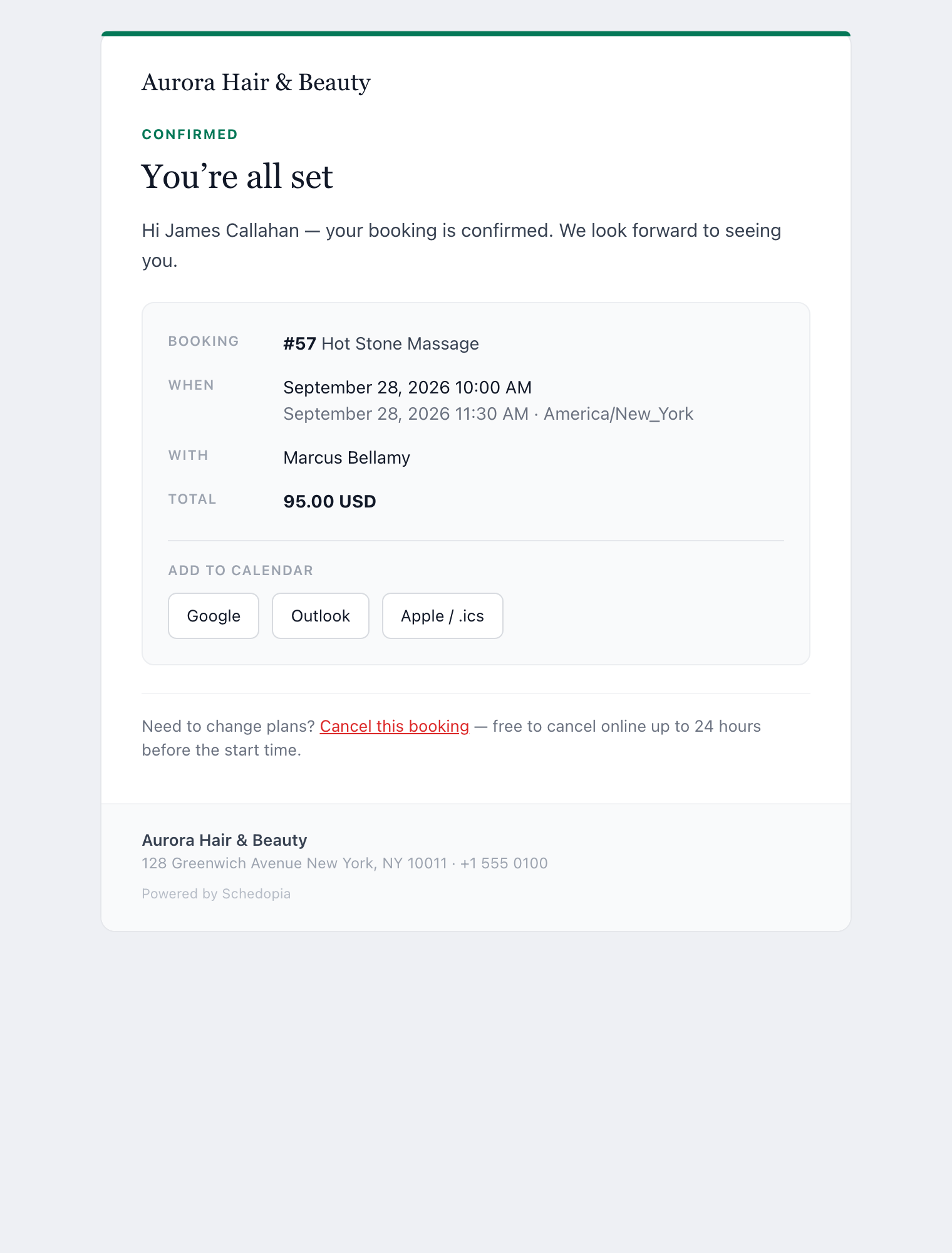
Moving a booking doesn’t email the customer in Schedopia 1.5.1. The reminder is re-armed for the new time and carries new calendar buttons, but the copy already in the customer’s calendar stays at the old time. Tell the customer yourself when you move one.
What Schedopia’s calendar sync won’t do
Schedopia’s calendar sync covers seeing bookings in your calendar and helping customers remember theirs. These are the gaps, as of version 1.5.1:
- No two-way sync. Events in Google Calendar or Outlook don’t block slots. Two-way sync is planned for Schedopia Pro, which isn’t on sale yet.
- Days off block whole days only. Set a day off for one person or the whole business under Scheduling. For a one-off hour, such as the dentist, the workaround is a booking of your own in that slot from New booking, which then counts in your booking numbers.
- One feed for everyone. There’s no feed per staff member; each person who subscribes sees the whole business.
- Refresh is up to the calendar app. The feed asks for hourly checks, but Outlook, Google and Apple decide.
If your working time lives in Google Calendar or Outlook and you can’t enter it twice, a booking tool with two-way sync will suit you better today.
Where to start
Today, open your calendar app and check which kind of sync you have. If your bookings arrive in a calendar you subscribed to by URL, it’s a feed: nothing you add in that app blocks a booking, so put your next day off into the booking system itself. In Schedopia, that’s Scheduling; the Scheduling docs cover days off, and the calendar feed docs cover subscribing in each app.
Frequently Asked Questions
What is booking calendar synchronization?
Booking calendar synchronization copies appointments between a booking system and a calendar app such as Google Calendar, Outlook or Apple Calendar. It comes in three kinds: a one-way calendar feed, two-way sync through the calendar provider's API, and add-to-calendar links that give a customer a one-off copy of a booking.
What is the difference between one-way and two-way calendar sync?
One-way sync shows your bookings in your calendar app and nothing more. Two-way sync also reads your calendar back, so an event you add in Google Calendar or Outlook removes that time from the booking form.
Why isn't a new booking showing in my Google Calendar yet?
Usually because the feed hasn't refreshed. A calendar you subscribe to by URL is re-downloaded on the calendar app's schedule, not when the booking is made, so a new booking can take hours to appear.
How often do subscribed calendars update?
It depends on the calendar app. Microsoft says calendars added in Outlook on the web update approximately every four hours, Apple Calendar on a Mac lets you choose the interval per calendar, and Google doesn't publish an interval for calendars added by URL.
Will an event in my Google Calendar block that time in my booking system?
Only with two-way sync. With a one-way calendar feed, which is what Schedopia has, an event you add in Google Calendar doesn't block anything; block the time in the booking system itself.
Does Schedopia sync with Google Calendar?
One way. Since version 1.2.0, Schedopia can publish a private calendar feed that Google Calendar, Outlook or Apple Calendar subscribe to. It doesn't read your calendar back; two-way sync is planned for Schedopia Pro, which isn't on sale yet.
Is a calendar feed URL safe to share?
No. Anyone with the address can read the calendar, so treat it like a password. If it leaks, rotate it in the booking system and subscribe again with the new address.
Do customers' calendars update when I move a booking?
Not when they added it with an add-to-calendar button, which saves a one-off copy. In Schedopia, the reminder email for the new time carries fresh calendar buttons, but the old copy stays in the customer's calendar until they remove it.