How to Increase Repeat Bookings From Existing Customers
How to increase repeat bookings from customers you already have: book the next visit before they leave, make rebooking one click and contact who's overdue.

A customer has a cut in March and says “see you in six weeks” on the way out. In July they book again, somewhere else. Nobody fell out: they meant to book, the week got busy, and when they finally looked, your Saturdays were full and the salon down the road had a slot. If you want to increase repeat bookings, this is the customer to plan for, not the unhappy one.
Lost regulars are easy to miss, because a customer who doesn’t come back makes no noise. There’s no complaint and no cancellation, just a gap in the schedule that gets put down to a quiet month. Owners who do notice tend to treat it as a loyalty problem and reach for a discount or a stamp card. It’s usually a friction problem: the next booking is left to the customer, and it takes them as much effort as the first one did.
We build Schedopia, a free, self-hosted WordPress booking plugin, so we have a stake, but most of what follows works with any booking system, or a paper appointment book. This post covers how to measure how many customers come back, the four reasons regulars drift, the fix for each, and what Schedopia 1.5.1 does and doesn’t do to help.
How do you measure repeat bookings?
Your repeat booking rate is the share of customers from one past month who have booked again since. Pick a month far enough back that a regular should have returned at least once, two or three months ago for a business whose customers come every five or six weeks, and count.
If 80 different customers came in during July and 44 of them have booked again by the end of September, your repeat rate is 55%. There’s no single good number to aim for, because a barber and a wedding stylist live on very different cycles. Compare yourself with the same count three months ago, and treat the 36 who haven’t been back as a list, not a statistic.
Two details keep the count honest:
- Count customers, not bookings. One regular who comes in weekly would otherwise look like four loyal customers.
- Decide what “overdue” means. Roughly one and a half times the usual gap works as a start. A customer on a five-week cycle with nothing booked after eight weeks is overdue.
In Schedopia, open Bookings, choose the Completed tab and click Export CSV. The file has every completed booking with the customer’s name, email and start time. Sort it by email and then by start time, and the last row for each email is that customer’s last visit. Schedopia matches customers by email address, so someone who booked once as sam@example.com and once as samantha@example.com shows up as two customers, one of whom seems never to have returned. The bookings docs list every column in the export.
Why do customers stop rebooking?
Customers who stop rebooking usually haven’t decided to leave. Four causes account for most of the gaps, and each has its own fix.
Nobody asked for the next booking. The visit ends with payment and a goodbye, and the next appointment is left to the customer’s memory, which is competing with everything else in their week.
Rebooking is as much work as the first booking. The customer has to find your site, find the service, pick a time and type their name, email and phone number again. Each step is a chance to think “I’ll do it tomorrow.”
Nothing reminds them that they’re due. Reminder emails are about appointments that already exist. Between visits, nothing goes out, so the only prompt is the customer noticing their own hair.
Their usual person or time is hard to get. Regulars book a person as much as a service. If the form starts at “first available” and their stylist’s Saturdays are gone, they start comparing you with everyone else.
How to increase repeat bookings
To increase repeat bookings, take the work of rebooking off the customer, one cause at a time. None of the four fixes below costs anything, and the first needs nothing more than a question at the desk.
Book the next visit before they leave
Booking the next appointment while the customer is still with you is the simplest of the four fixes, because it turns “I must book” into a date in their calendar. Ask with a specific date, not a general offer. “Same time in five weeks, Thursday the 3rd at 10:00 AM?” gets a yes or a no. “Would you like to book again?” gets “I’ll call you.”
The trade-off is that a booking made five weeks ahead is easier to forget than one made last week. Lead time, the gap between booking and appointment, is one of the most commonly reported predictors of no-shows, as the research cited in how far in advance customers should be allowed to book shows. So make sure the reminder email is on when you start booking people further out. In Schedopia it goes 24 hours before by default, and can be set anywhere from 1 hour to 168 (a week) under Settings → Notifications.
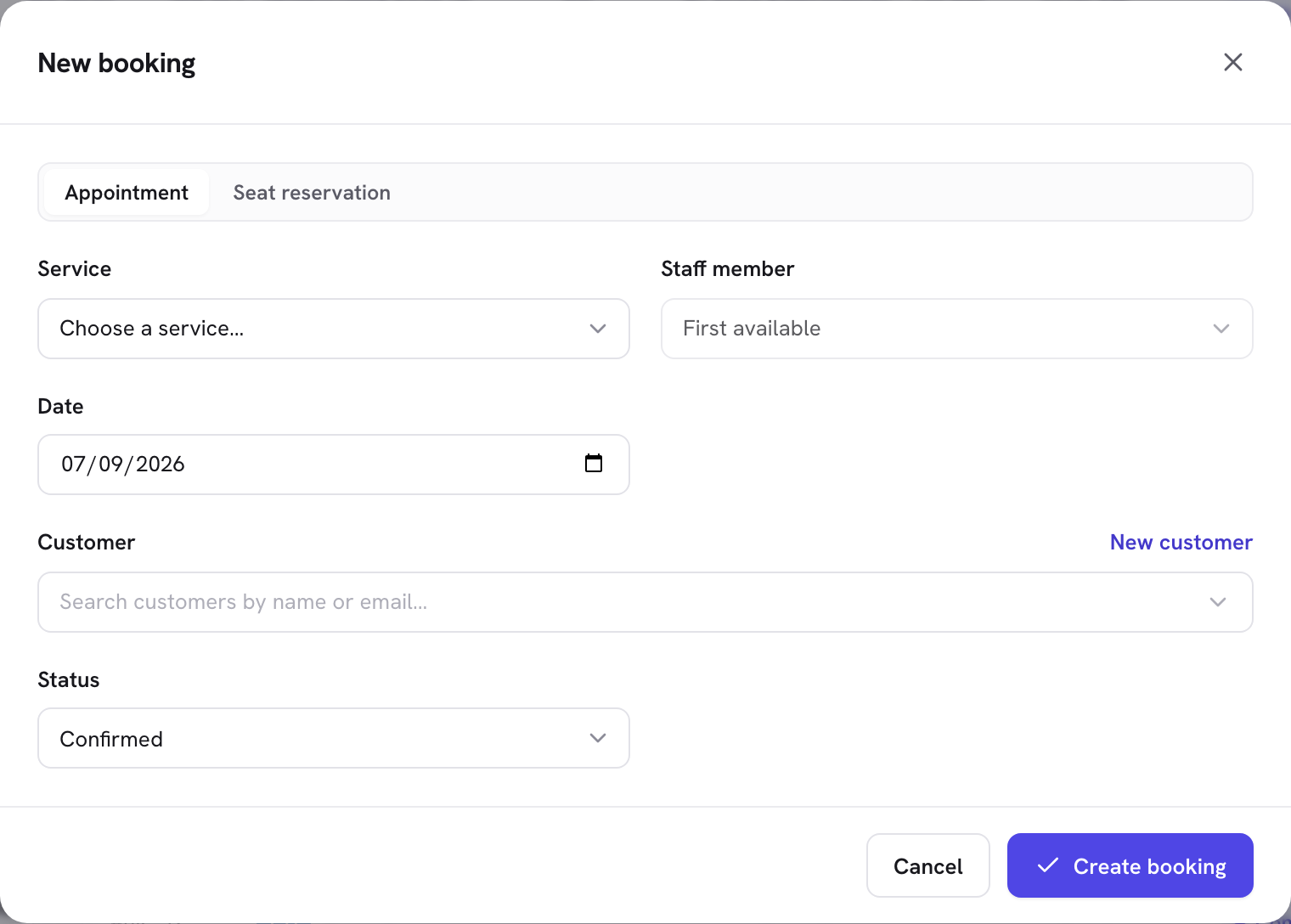
In Schedopia, the public booking form offers today and the next 14 days, so a five-week rebooking goes in from the admin. Click New booking, choose the service and the customer’s usual staff member, pick the date and time, find the customer by name or email and leave the status on Confirmed. Bookings you make yourself aren’t limited to two weeks, and they get the same double-booking guard as the form, so you can’t double-book a slot from the desk. The customer is sent the usual confirmation email, with add-to-calendar buttons.
Make rebooking one click
A returning customer shouldn’t have to fill out the booking form from scratch. Since version 1.4.3, Schedopia can give each customer an account on your site, with a My bookings page that lists their upcoming and past bookings. Book again on any of them opens your booking page with the same service already chosen, and a signed-in customer finds their name, email and phone already filled in. All that’s left is picking a time.
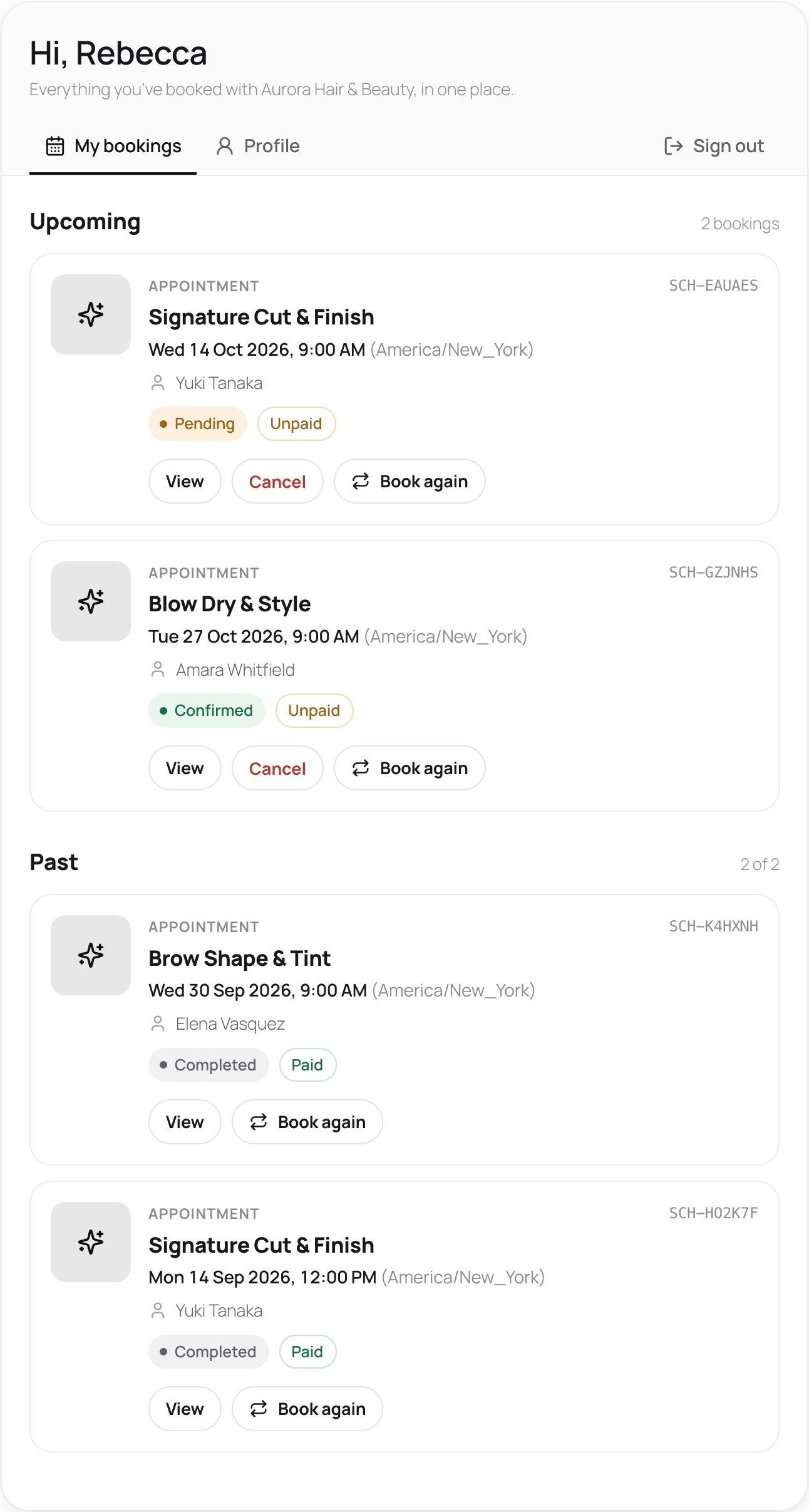
Accounts are on by default, and customers get one in one of two ways, chosen under Settings → Customer portal. With Customer chooses, the booking form has a “Create an account” checkbox. With Always, on first booking, every new email address gets an account and a link to set a password. If most of your business is regulars, Always means nobody misses out by leaving the box unchecked; the cost is a WordPress user for every one-off booker too. The 1.4.3 release post covers both in more detail.
Book again chooses the service, not the person, so the customer still picks their staff member and time. And Schedopia doesn’t add My bookings to your menu for you. Put it next to your booking page link, where a returning customer will look for it.
Make their usual person easy to book
Regulars often book a person rather than a service, so give each staff member a booking link of their own. Schedopia’s Staff List block (also an Elementor widget and the [schedopia_staff] shortcode, since 1.5.0) shows your team as cards. Book on a card opens the form with only that person’s services, and chooses them as the staff member once the customer picks one.
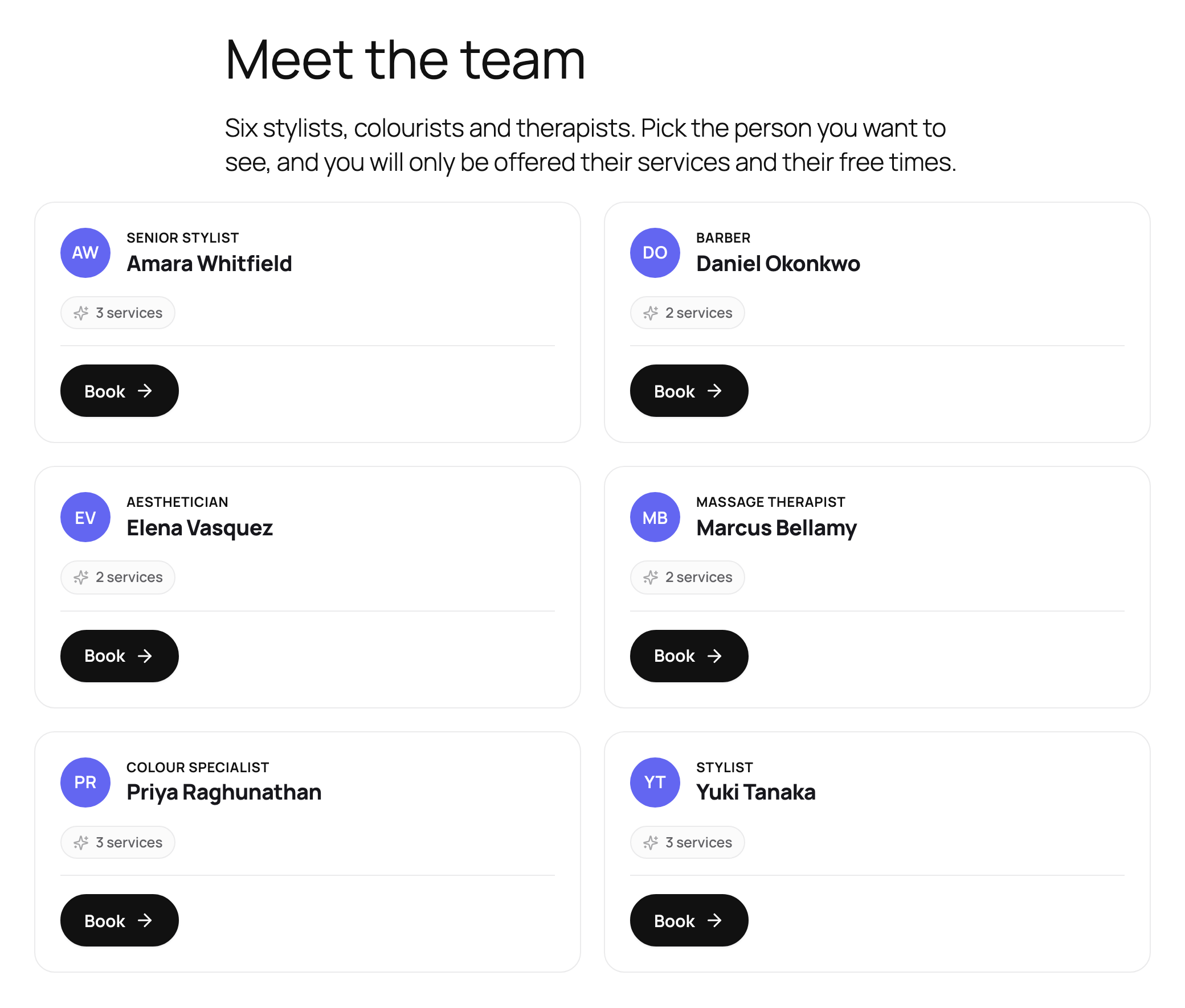
For a page that belongs to one person, [schedopia_booking staff="3"] gives a booking form limited to staff member number 3, which you can link from that person’s profile, their Instagram bio or the card you hand over at the desk. The 1.5.0 release post has the rest of the options.
Contact customers who are overdue
Customers who are past their usual gap are worth one short, personal message from you. Schedopia doesn’t send a “time to book again” email, as of version 1.5.1, so the list and the message are both yours to make, and for a small business that’s a short job once a week.
To find who’s overdue, use the export from the first section, or ask an assistant. If you’ve connected ChatGPT or Claude to Schedopia, it can list completed bookings for a date range and look up a customer’s latest bookings, so you can ask “Which customers had a completed appointment in August and have nothing booked since?” and get names back instead of a spreadsheet.
Keep the message about the customer and one specific offer:
Hi Rebecca, it’s been seven weeks since your cut and color with Priya. She has Thursday at 10:00 AM free next week. Reply and it’s yours.
One message, not a sequence. If there’s no answer, leave it. Send it one person at a time, about their own appointments; a bulk promotion to everyone in the export is marketing, and in many places that needs the customer’s permission first.
Hold back on discounts. A customer who drifted away because the week got busy comes back for a date and an easy way to book. A discount for returning costs you margin on someone who would have booked anyway, and teaches your regulars to wait for the next one.
What Schedopia won’t do for repeat bookings
Schedopia makes rebooking easy for customers but doesn’t chase them for you, as of version 1.5.1. If you’re weighing it for a business that lives on regulars, these are the gaps:
- No follow-up emails. Schedopia emails customers about bookings that exist: confirmations, requests received, cancellations and reminders. Nothing goes out after a visit, and marking a booking Completed sends no email.
- No recurring bookings. A standing weekly or monthly slot is entered one booking at a time. Recurring bookings are planned for Schedopia Pro, which isn’t on sale yet.
- Two weeks on the public form. Customers can book online up to 14 days ahead, and there’s no setting to change it. Longer cycles are rebooked from the admin.
- No last-visit column. The Customers screen lists contact details, and each customer’s history is a click away, but finding everyone who’s overdue means the export or an AI assistant.
- No loyalty schemes, discount codes or SMS, and no online card checkout.
- Customers can’t move an appointment themselves. From My bookings they can cancel within your cut-off and book again; moving a booking to another time is done by you.
If you want win-back emails that send themselves, or text-message reminders, a booking tool with built-in marketing automation will suit you better today.
Where to start
Today, pick a month two or three months back, export your completed bookings and count how many of that month’s customers have booked since. Then change one thing for a month: offer every customer a specific next date before they leave, and book it in there and then. Count again at the end of the month and see whether the number moved. For how repeat bookings fit with the rest of an appointment system, see the complete guide to WordPress appointment booking.
Frequently Asked Questions
How do I increase repeat bookings?
Take the work of rebooking off the customer. Offer a specific next date before they leave, let returning customers rebook without filling the form in again, make their usual staff member easy to book, and send one personal message to anyone past their usual gap.
How do I work out my repeat booking rate?
Take every customer who came in during one month, two or three months ago, and count how many have booked again since. Divide by the number of customers, not bookings, so one weekly regular doesn't count as four.
Should I offer a discount to bring customers back?
Usually not as a first step. Most customers who stop rebooking haven't decided to leave, so a specific date and an easy way to book fixes the gap for free. A discount for coming back also teaches regulars to wait for the next one.
Can customers rebook in one click with Schedopia?
Yes, if they have a customer account. Since version 1.4.3, Schedopia's My bookings page has a Book again button that opens your booking form with the same service already chosen, and a signed-in customer's details are filled in for them.
Does Schedopia send an email when a customer is due to book again?
No. As of version 1.5.1, Schedopia emails customers about bookings that exist: confirmations, requests, cancellations and reminders. Finding and contacting customers who are overdue is done by you, from the bookings export or an AI assistant connected to Schedopia.
Can I book a customer's next appointment weeks ahead in Schedopia?
Yes, from the admin. The public booking form offers today and the next 14 days, but New booking in the admin takes any date, so a regular on a six-week cycle can be booked in before they leave.
Does Schedopia support recurring appointments?
No. As of version 1.5.1, a standing weekly or monthly appointment is entered one booking at a time. Recurring bookings are planned for Schedopia Pro, which isn't on sale yet.